

Key Takeaways
- Attacks exploiting public-facing applications increased by 44% year over year. This highlights the importance of keeping internet-facing systems up to date to address known security vulnerabilities. (IBM)
- Ransomware was involved in 48% of breaches, as reported in Verizon's 2026 DBIR. This highlights why businesses need to prepare for ransomware before an incident occurs. (Verizon)
Introduction
As businesses use more cloud services and connected devices, cyber threats have also become more sophisticated and more dangerous. The use of AI-based tools in organizations has also given attackers new ways to carry out phishing, social engineering, and other techniques used to gain access to business systems and sensitive data. At the same time, phishing, ransomware, account compromise, and data theft remain common security threats.
Therefore, it is important for organizations to review the basics and ensure their security controls are working as expected. Good cybersecurity cannot be defined with a single tool or policy. Businesses will have to regularly update the tools and implement strong access controls. Continuous monitoring is the need of the hour, but equally important is having reliable backups and employee awareness training from time to time.
Some businesses may not have enough internal security resources to detect and contain cyber threats. Those businesses can opt for managed cybersecurity services for their daily security monitoring and response.
In this blog, we will discuss 10 practical cybersecurity tips that organizations can follow to reduce risk and improve their overall security.
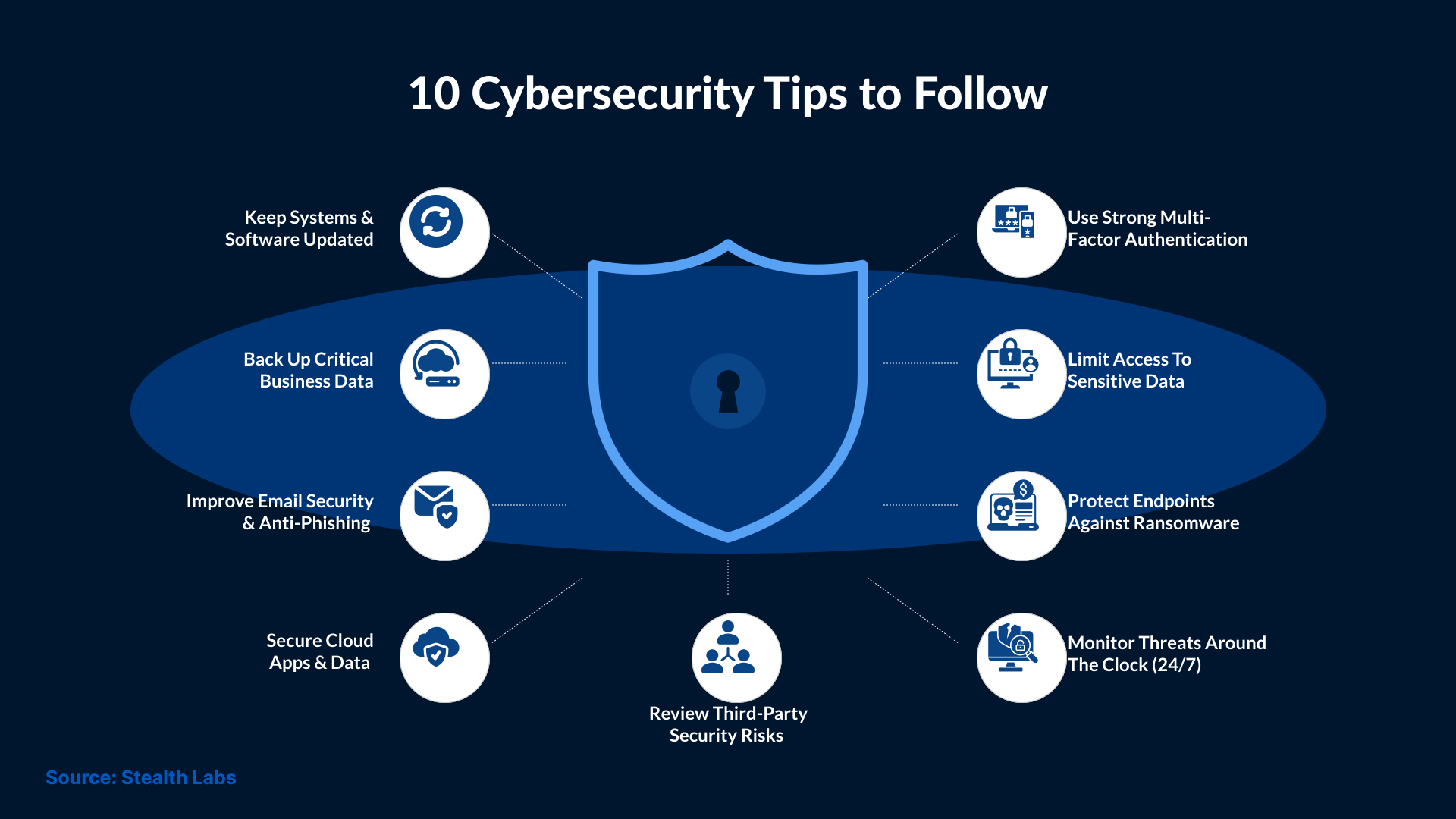
The following cybersecurity tips focus on practical steps that businesses can take to reduce common security risks. These steps cover monitoring and access. They also cover systems and data, along with day-to-day security practices.
Use Strong Multi-Factor Authentication
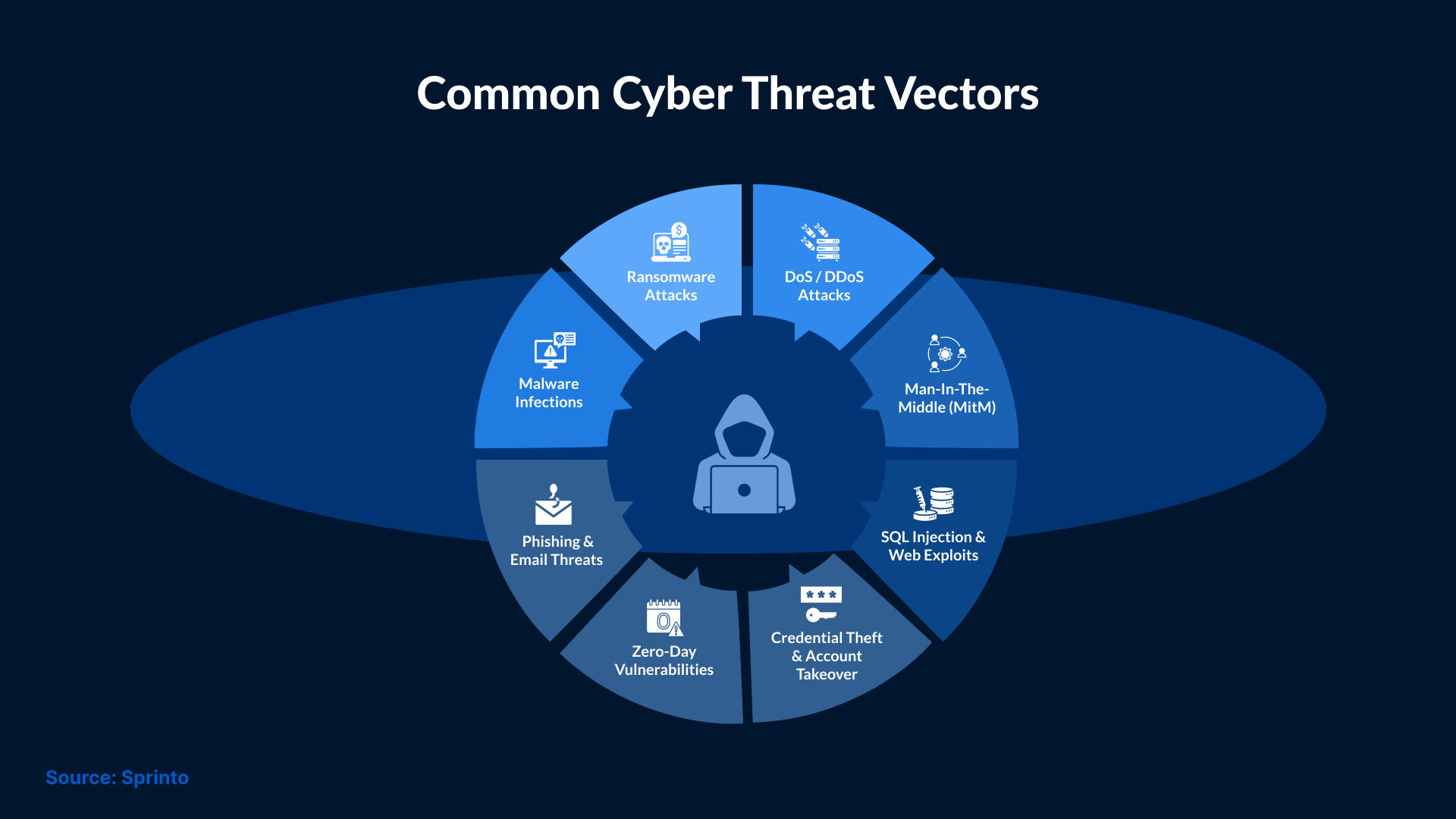
You can set strong passwords for your systems and apps, yet they won’t be enough to protect important business accounts. Cyberattacks like phishing and credential theft target passwords, and once attackers obtain them, they can access restricted accounts with little difficulty.
Multi-factor authentication can make this harder by adding another verification step before access is granted to an account, application, or system. This may include a security key or authenticator app. Biometric checks are also used to verify the user's authenticity.
It’s important for businesses to enable MFA for email and administrator accounts. MFA should also be applied to cloud applications and remote access. Organizations should use phishing-resistant MFA where appropriate, especially for accounts with higher levels of access.
MFA does not guarantee protection against unauthorized access, but it can make it harder for attackers to use stolen passwords to access business systems.
Keep Systems and Software Updated
Outdated software can leave known security vulnerabilities unpatched. Attackers can exploit those vulnerabilities to gain access to systems and devices, then move laterally within the environment.
Therefore, it’s imperative for organizations to install security updates and patches on time, especially for systems that are exposed to the internet or those handling sensitive data. Apart from that, organizations should keep track of older software that the vendor no longer supports.
Regular patching helps close known security gaps, which in turn reduces the likelihood that attackers exploit them to gain access to business systems.
Improve Email Security Against Phishing
Email is one of the most common ways attackers try to contact employees. They use phishing emails that include fake login pages or requests that appear to come from a trusted person. In other cases, emails include malicious links or infected attachments that users click or download, thinking they are safe. If a user opens a malicious attachment or follows a malicious link, it can lead to malware infection or unauthorized access.
Businesses can reduce these risks by implementing email security controls that check messages for suspicious links and attachments. These controls also help identify spoofed senders and unusual activity taking place in the email account.
Employee training plays a key role in safeguarding official email accounts. Organizations should conduct periodic training for employees so that they can verify unexpected requests involving passwords, payments, or sensitive information. A combination of email security tools and employee awareness can help reduce the risk of phishing and business email compromise.
Limit Access to Sensitive Data
Not every employee needs access to every application, file, or device. With unnecessary access, the risk of account compromise increases.
Users should only have access to the systems and data they need for their work. Access should be reviewed when someone changes roles or leaves the company.
Administrator accounts need extra protection. These accounts can make changes to critical systems, so they should not be granted to users unless required.
Oraganizations can reduce unncessary exposure to critical systems and data by limiting access. It will also make it harder for attackers to move laterally within the business environment after gaining access to a single account.
Protect Endpoints Against Ransomware
Endpoints such as desktops, laptops, and servers are prone to ransomware attacks. If one endpoint is compromised, then attackers may try to move further into the network or access sensitive data.
Businesses should use endpoint protection that can detect suspicious activity and block known threats. Security teams should also investigate detected incidents and respond as needed. Tools used for endpoint protection help security teams understand what actually happened and which systems may be affected.
The effectiveness of these tools depends on whether they are up to date and active across all business devices.
Secure Cloud Apps and Data
Businesses increasingly rely on cloud applications for their daily operations. These applications are used for tasks such as email and file sharing. They may also be used to manage customer data and support collaboration. Internal security teams should thoroughly review the accounts and settings of cloud applications, as if they are not properly secured, sensitive information may be exposed.
Additionally, it’s important for teams to review who has access to cloud apps and data. Teams should use strong authentication and remove access that is no longer needed. Teams must also pay attention to security settings. Regular checks are important to ensure that files, folders, and applications are not shared more widely than intended.
Good cloud security helps reduce the risk of unauthorized access and accidental exposure. It also reduces the chances of sensitive business data being misused.
Back Up Critical Business Data
Having a reliable backup can help a business recover after an attack, accidental deletion, or hardware failure. Without a usable backup, it may take much longer to recover important files and systems.
Therefore, it’s important for businesses to back up all critical data regularly. Moreover, the backups should be kept in a safe, isolated location with minimum access.
Creating backups is only part of the process. Organizations should also test them regularly to make sure the data can be restored when needed.
A tested backup and recovery process can help reduce downtime and ensure faster recovery after a security incident.
Monitor Threats Around the Clock
Security threats can occur at any time, including outside normal business hours. If organizations fail to detect suspicious activity on time, then it may allow attackers more time to access systems and move through the network to steal data.
Businesses should monitor important systems, networks and cloud environments. It’s important for security teams to check every endpoint and user activity for signs of suspicious behavior. Teams should also have a clear process for investigating alerts and responding to confirmed threats.
Businesses with limited internal security resources can rely on managed cybersecurity services for 24x7 monitoring and response support. This can help organizations detect suspicious activity earlier and respond more quickly.
Review Third-Party Security Risks
Businesses often rely on third parties to support their day-to-day operations. Third parties can be anyone, from vendors and suppliers to cloud platforms. These relationships may also involve access to business systems or sensitive data.
Therefore, it becomes important for organizations to review the security practices of important third parties before giving them access to systems or data. Organizations can check the security controls and access requirements of third parties. Along with that, they can also check incident response processes and relevant security certifications.
Access should be granted based on the role each third party needs to perform. Organizations should review the access requirements of third parties and remove them when no longer required.
Reviewing the security access of vendors and suppliers can help businesses identify potential risks and reduce unnecessary exposure through third-party relationships.
Use Managed Cybersecurity Services
Managing cybersecurity internally can be difficult for an organization with limited security staff, tools, or expertise. This is because security monitoring is also needed outside normal working hours.
To solve this problem, such organizations should opt for managed cybersecurity services, which provide ongoing support for security monitoring, threat detection, investigation, and response. Depending on the chosen service, a provider may also help manage security tools and respond to alerts or incidents.
As a result, it is important for businesses to review the included services and covered systems before choosing a provider. Apart from those, businesses should also check how the provider handles alerts and escalates confirmed incidents. Response times and reporting are also crucial aspects to review before finalizing any managed security provider.
If the requirement also includes additional security resources, businesses should look for a provider that supports day-to-day security operations and provides access to security expertise without requiring them to manage everything internally.
How Managed Cybersecurity Services Support 24/7 Monitoring
Cyber threats don’t follow a fixed schedule. Suspicious activity can happen on weekdays, weekends, during and after business hours. So, it’s important for organizations to have round-the-clock security monitoring to identify and respond to threats as they are detected.
Managed cybersecurity services help monitor security alerts throughout the IT environment and investigate suspicious activity. Depending on the scope of the service, security teams can also assist with incident response and escalation when a threat is identified.
Such assistance can be very useful for businesses that don’t have enough internal resources to maintain continuous monitoring. It allows them to have additional security support while their internal team focus on other IT priorities.
Before selecting a managed service, organizations should clearly understand the monitoring coverage and response process. They should also review the escalation procedures that the service provider will take, along with the systems included in the service.
What to Look for in a Cybersecurity Services Provider
Choosing a cybersecurity services provider requires more than just checking the number of security tools they offer. Businesses should first understand their own security requirements before evaluating the provider and its capabilities.
Once businesses outline their requirements, they can start reviewing the cybersecurity services provider on the following parameters:
- Monitoring coverage
- Response process
- Supported technologies
- Escalation procedures
Apart from these parameters, it’s also important to understand who investigates the alerts and how the provider communicates during a security incident.
Since every provider operates differently, businesses should review the service scope, reporting, response times, and any responsibilities currently handled by the internal team. Clear expectations can help avoid gaps in security coverage.
Businesses need to ensure that the approach used by their cybersecurity managed services aligns with their security needs and available internal resources. A clear understanding of the service can help businesses make a more informed decision before signing an agreement.
Conclusion
Cybersecurity requires regular attention to systems, devices and applications. It’s important to review security controls as the business environment changes.
Simple security practices like implementing MFA and updating software can reduce common risks. But organizations should also review who has access to important systems and data.
Regular monitoring is a crucial part of cybersecurity, as it helps businesses identify suspicious activity and respond faster to threats. However, some businesses may not have enough internal resources for continuous security monitoring.
In such cases, SafeAeon, as a Managed Cybersecurity Services Provider, can provide additional support. SafeAeon can help businesses review their security needs and available resources and determine where additional security support may be needed.