

Key Takeaways
- 4 in 10 outages cost between $100,000 and $1 million, while about one in six cost more than $1 million. This is why early issue detection is important for business continuity. (Velir)
- Organizations exceeded their cloud budgets by an average of 23%, and 30% of cloud spend was estimated to be wasted. This shows why cloud monitoring is important for tracking usage and controlling costs. (Flexera)
Introduction
Cloud monitoring helps teams keep an eye on their cloud systems and helps keep them running smoothly during day-to-day operations. It gives them a clearer view of application and infrastructure behavior. When something changes or starts to go wrong, monitoring helps surface it early. This makes it easier to respond before it affects users or business operations.
What is Cloud Monitoring?
Cloud monitoring is the process of tracking system performance and activity to help teams understand what is happening in their environment. For this, different tools are used to collect data from systems and highlight changes in behavior.
This helps teams understand the current state of their environment in order to spot issues early. It does not directly prevent security threats, but it can surface unusual activity that needs attention.
As cloud environments continue to grow, monitoring plays an important role in maintaining stability and reducing operational risk.
Where Cloud Monitoring is Used
Web applications and services: Cloud monitoring is used to track traffic and availability. Teams also use it to monitor application behavior when users interact with them.
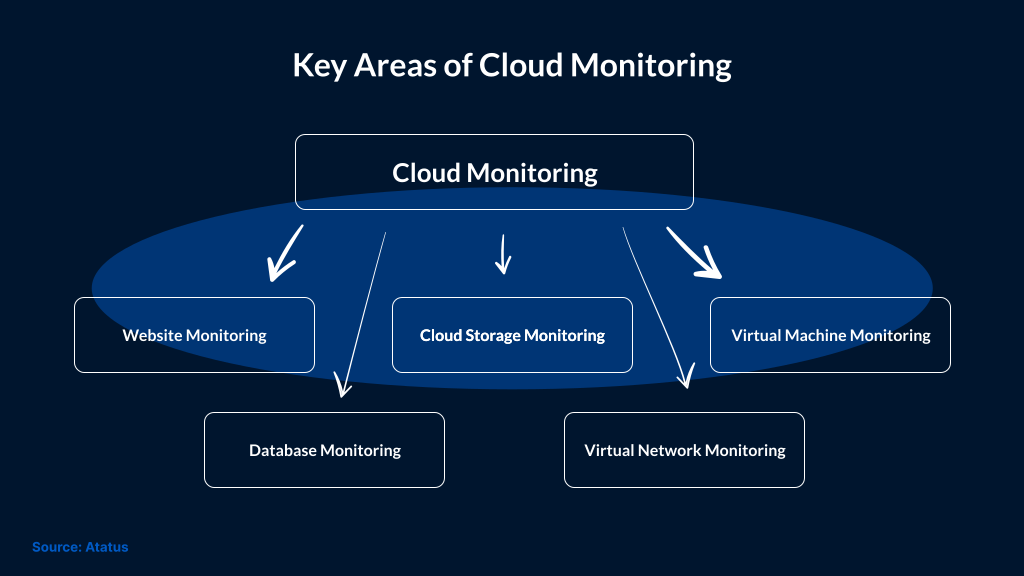
Virtual environments: This focuses on virtual machines and the infrastructure behind them, so teams can understand how everything is running under the hood.
Cloud storage: Track storage usage and how applications and databases access data.
Network activity: Observe connections, traffic flow, and performance across the cloud network.
Key Benefits of Cloud Monitoring
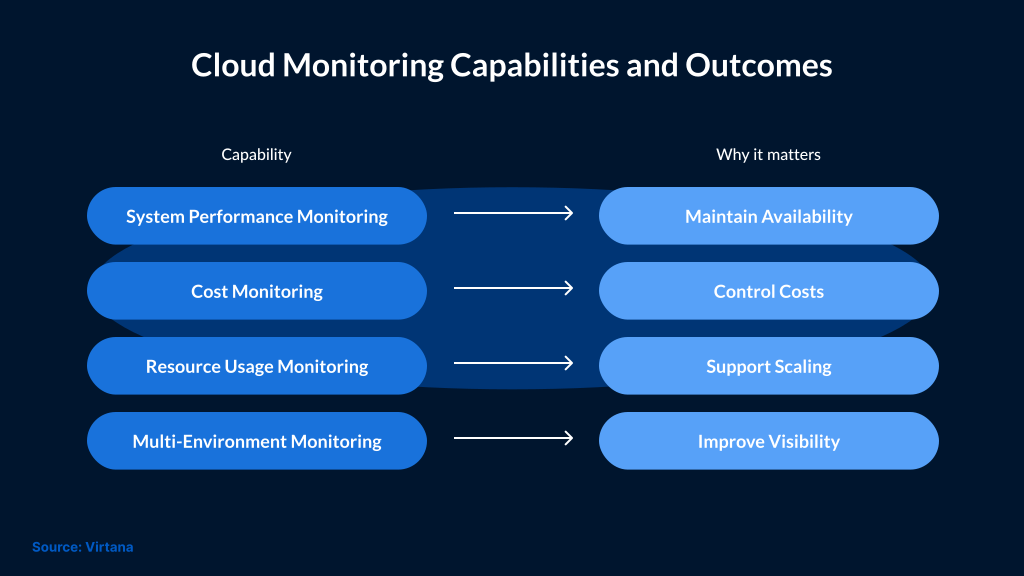
- Better Visibility: Cloud monitoring helps teams see what is happening within the environment and identify issues early.
- Data Visualization: It is easier to understand system performance and track trends over time using dashboards and graphs.
- Centralized Monitoring: Cloud monitoring helps view data from different systems in one place. With this, it’s easier to track activity and respond to issues.
- Improved Security Awareness: Monitoring allows teams to identify unusual activity that may need investigation. However, monitoring cannot replace security tools.
- Cost Control: Teams can track usage to identify unused or overutilized resources. This helps manage cloud costs more effectively.
- Compliance Support: Monitoring helps maintain the logs and visibility required for compliance standards like HIPAA and PCI DSS.
- Faster Incident Response: Teams can detect issues early and also act before they impact users or business operations.
How Cloud Monitoring Supports Business Operations
Cloud monitoring plays an important role in day-to-day operations. It helps teams understand changes in system behavior and respond before issues escalate further.
When systems start to slow down or behave differently, monitoring can help teams understand what is changing. This reduces the time needed to investigate and respond. It also leads to better decision-making. Teams can use monitoring data to understand usage patterns and adjust resources based on actual demand.
Monitoring also helps maintain consistency in growing environments. Teams can easily track systems across different workloads and ensure everything is working as expected.
Over time, this results in more stable operations and fewer unexpected disruptions.
Cloud Monitoring Platforms
AWS (Amazon Web Services)
AWS provides monitoring through Amazon CloudWatch. It collects logs and metrics from AWS resources, which teams use to track performance and system activity. The data is also used to identify issues and support operational decisions.
Google Cloud Monitoring
Google Cloud Monitoring collects metrics across cloud and hybrid environments. It provides dashboards and alerts to help teams track system behavior and respond to changes. It also integrates with incident management tools such as Slack and PagerDuty.
Azure Monitoring
Azure Monitor collects and analyzes data from Azure resources and applications. It helps teams track performance, monitor availability, and respond to issues in real time.
Limitations of Cloud Monitoring
Cloud monitoring provides visibility into system performance and activity, but it has its limits.
It collects data but doesn’t always identify threats on its own. It can miss critical signals without proper analysis.
Large environments often generate large volumes of alerts, making it harder to focus on those that need attention.
Monitoring can be challenging when systems are spread across multiple environments. In such cases, additional tools are required. Otherwise, visibility becomes fragmented.
To address this, teams usually combine monitoring with SIEM or XDR platforms. This helps bring data together and improve response.
Conclusion
Cloud monitoring plays a key role in helping teams understand how their systems are running and where issues may arise. It gives visibility into performance and activity, which is important as cloud environments continue to grow.
However, monitoring alone is not enough. It needs to be supported by the right tools and processes to turn data into meaningful action.
Choosing the right approach depends on your environment, your system architecture, and how your team manages operations.
SafeAeon works with organizations to set up and align cloud monitoring with their broader security and operational needs. This helps improve visibility, reduce response time, and bring more clarity to complex cloud environments.