

Key Takeaways
- 82% of breaches involved the human element, including stolen credentials, phishing, misuse, or error. This makes user activity and access monitoring a core SIEM use case. (Verizon)
- Organizations with fully deployed security AI and automation reduced breach costs by $3.81 million compared to organizations without these capabilities. This supports the need for SIEM and SOAR workflows that help teams detect and respond faster. (IBM)
Introduction
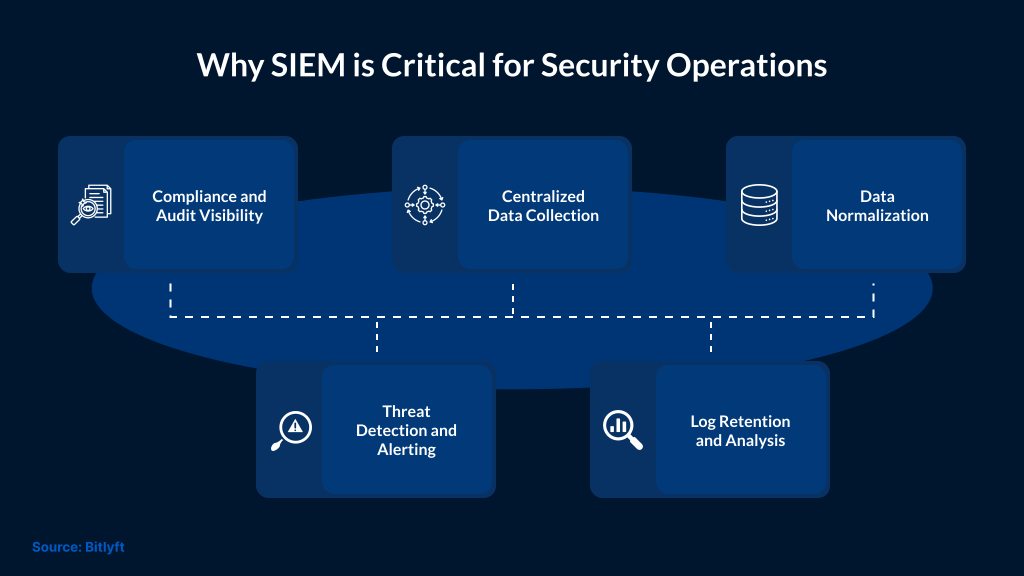
SIEM platforms do a lot more than just collect logs and raise alerts. In modern environments, activity is generated from endpoints, cloud platforms, identities, and applications. This creates visibility gaps where threats can operate without detection.
As more attacks now use identity abuse and fileless techniques, it’s important for SIEMs to provide more than just basic monitoring. It’s more important to correlate signals from different parts of an environment to detect early indicators of compromise and reduce response time.
Identity and Access Threat Detection
Identity-based attack patterns
Compromised credentials remain one of the most common entry points for attackers. They use techniques like Pass-the-Hash, brute-force attacks, and Kerberos Golden Tickets to gain unauthorized access while making user activity appear legitimate.
Detection signals in SIEM
A SIEM correlates authentication logs, access patterns, and user behavior. Common indicators of credential misuse include spikes in failed logins, unusual login times, and access from unfamiliar locations.
Privileged access monitoring
It’s important to thoroughly monitor privileged accounts due to elevated access. Any deviation from normal activity, such as unexpected system access or administrative actions, should be flagged immediately.
Response and impact containment
If the system is compromised, it is critical to identify affected users and systems quickly. This allows teams to assess the impact and contain the activity. This helps limit further impact.
System and Configuration Monitoring
A strong indicator of malicious activity is unauthorized changes to the system configuration. This includes modifications to security settings and the creation of new accounts. At times, audit logs are also deleted to hide malicious activity.
A SIEM monitors system logs and correlates events from endpoints and servers to detect these changes. Any deviation from approved configurations or expected behavior should be flagged for investigation.
Audit trail integrity and visibility
Tampering with audit logs is a critical red flag. Attackers usually try to erase or modify logs to hide their activity. With continuous monitoring, these actions can be detected early.
Security teams should prioritize alerts related to log deletion and modification. Logging gaps should be taken seriously because they reduce visibility across the environment.
Response and impact control
Once teams detect unauthorized changes, they must escalate with high priority. With early detection, teams get enough time to investigate the source and revert changes if required. They can prevent further impact on systems and operations.
Cloud and SaaS Activity Monitoring
Cloud applications generate a high volume of user and system activity. This includes file sharing, login events, data access, and configuration changes. This activity can go unnoticed without visibility.
A SIEM ingests logs from cloud platforms like Salesforce, Microsoft 365, Google Workspace, Box, Dropbox, and AWS. Teams inspect these logs to understand activity within the cloud environment.
Monitoring access and user behavior
Most cloud activity looks normal. Users log in to systems and access files. Everything looks like routine tasks. Risk increases when access patterns change, logins are performed from unknown locations, large amounts of data are downloaded at once, or attempts are made to access systems outside normal hours.
A SIEM detects these changes by comparing current activity with past behavior.
Security and compliance tracking
It’s important for cloud environments to meet security and compliance requirements. This includes enforcing access controls and tracking how organizations use data.
A SIEM helps record who accessed data, what actions were taken, and when they were taken. This information is crucial in security monitoring and audit requirements.
Phishing Detection and Initial Access
Phishing is one of the most common ways attackers gain initial access. It is used to steal credentials and deliver malware. Users are also tricked into taking unsafe actions.
A SIEM can track phishing activity. It can correlate email logs with user actions and authentication events to identify who received and clicked a phishing email, and whether any credentials were exposed.
Things become riskier when phishing leads to valid account access. At that point, activity may appear normal, which makes early detection critical.
SIEM connects email activity with login behavior and system access to identify compromised users. Once identified, teams can respond quickly to limit further impact.
SIEM for Compliance (GDPR, HIPAA, PCI DSS)
There are regulatory requirements that organizations must meet to ensure data is accessed and stored safely. Frameworks like GDPR, HIPAA, and PCI DSS require visibility into user activity and access to sensitive data.
A SIEM can help meet these requirements by collecting and retaining logs from each system in the environment. It records who accessed the data, what actions were taken, and when those actions occurred. This helps create a clear audit trail for use during compliance reviews.
Besides supporting compliance, a SIEM can help detect policy violations and unauthorized activity. Any unusual change can be flagged for investigation.
Threat Hunting with SIEM
Threat hunting is used to find activity that didn’t trigger alerts. It looks for patterns that indicate an attacker may already be inside the environment.
A SIEM supports threat hunting by providing access to data across the environment. They review data, including authentication logs, endpoint activity, and network events, to identify suspicious behavior.
Hunting usually starts with a weak signal, like a login that does not match past behavior or a process running in an unusual context. Each of these events won’t raise an alert, but when reviewed with related activity, it can point to a larger issue.
SIEM helps teams connect these signals and build an event timeline. This helps them confirm whether the activity is benign or part of an ongoing threat.
Threat hunting improves detection over time. Findings from it can be used to create new detection rules. This helps reduce the chance of similar activity going unnoticed again.
SIEM Integration with SOAR for Automation
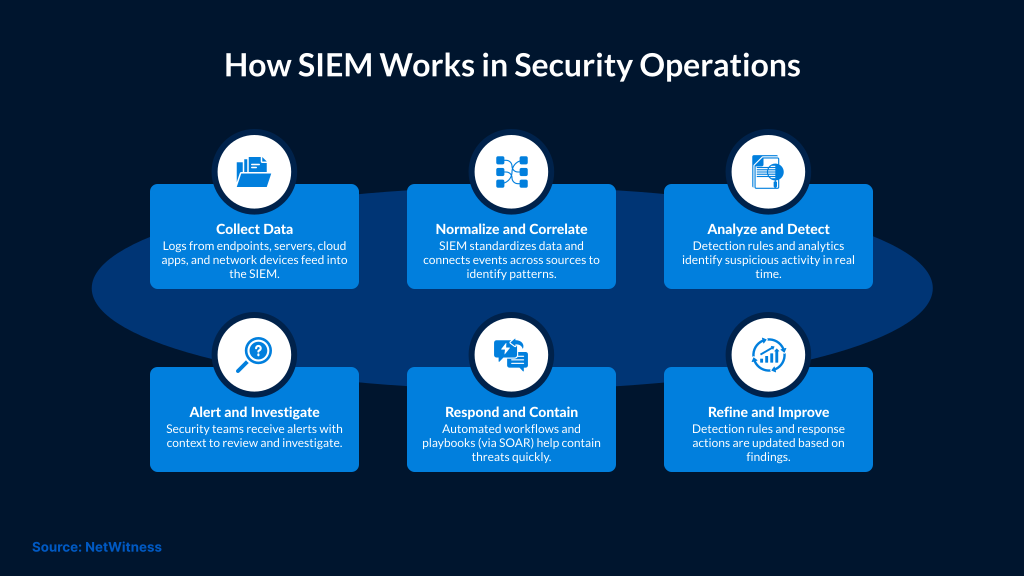
SIEM generates alerts based on correlated events. Alerts do not resolve issues without action. For quick response, teams depend on automation. If done manually, it would slow down containment.
SOAR integrates with SIEM to execute predefined actions when specific conditions are met. This can include isolating a host or disabling a user account based on the alert context. In some cases, it can trigger a broader response workflow.
Automation reduces response time and ensures consistent actions, as the same steps are followed each time an alert meets the defined criteria. But automation should not be applied to all actions. High-risk changes should be reviewed by analysts. Automation works best for repeatable tasks, whereas critical decision-making is left to analysts.
SIEM and SOAR help teams move from detection to response faster.
Conclusion
SIEM plays a key role in security operations, but its value depends on how it is used. In modern environments, activity happens across endpoints, cloud systems, and identities. It is easier for attackers to blend attacks into normal behavior in such environments.
Collecting logs alone is not sufficient. It’s important to connect signals and identify early indicators of compromise. This helps teams act before the impact spreads.
With SafeAeon, SIEM is not treated as a standalone tool. It is part of a managed approach that combines continuous monitoring and response. As a result, teams can reduce detection time and maintain visibility across environments. This also helps teams handle incidents with greater control.