

Key Takeaways
- Cyberattacks increased sharply during the early stages of the COVID-19 pandemic, with reports indicating a 400% rise in cyberattacks and a 350% increase in malware activity compared to 2019. (NCBI)
- Google reported detecting over 18 million COVID-19-related phishing and scam emails per day targeting Gmail users during the pandemic. (BBC)
Introduction
The COVID-19 pandemic has disrupted business operations and reshaped how organizations approach cybersecurity.
As workforces shifted rapidly to remote environments, access patterns changed, endpoints moved outside controlled networks, and reliance on digital systems increased significantly.
This shift has created new exposure points. Security teams are now dealing with reduced visibility, increased user activity, and a growing volume of phishing and malware-based attacks.
In many cases, threats do not appear as obvious incidents. They blend into normal activity, making early detection more difficult and response more delayed.
How the COVID-19 Pandemic Affected Cybersecurity
Work from Home
Businesses and public-sector organizations have rapidly adopted work-from-home models as part of their response to the COVID-19 pandemic. This shift has changed how users access systems, data, and applications on a daily basis.
In many cases, employees are working on personal or unmanaged devices and connecting through home networks that are not monitored or controlled by the organization. These environments often lack security controls such as endpoint protection, patch management, and centralized logging. This reduces visibility for security teams and increases the risk of compromise.
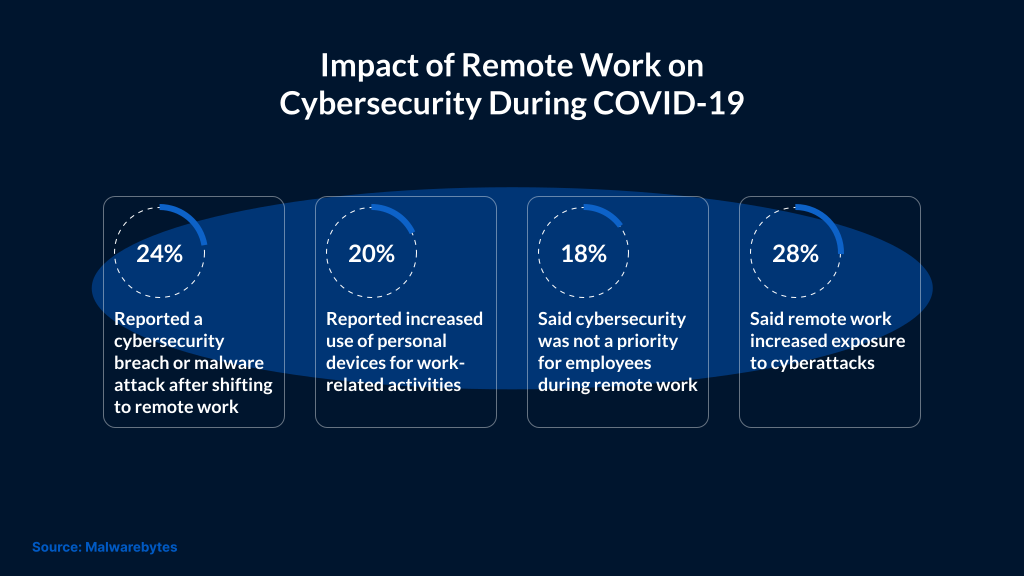
The increase in remote access has also expanded the attack surface. More endpoints, more access points, and fewer controlled environments make it easier for attackers to find entry points. As a result, users need to be cautious when interacting with emails, links, and attachments, especially when the source is unknown or unexpected.
Scams, Fraud, and Misinformation
As COVID-19 continues to spread globally, people are actively searching for updates, safety measures, and official guidance. This surge in demand for information has created an opportunity for cybercriminals to exploit user behavior.
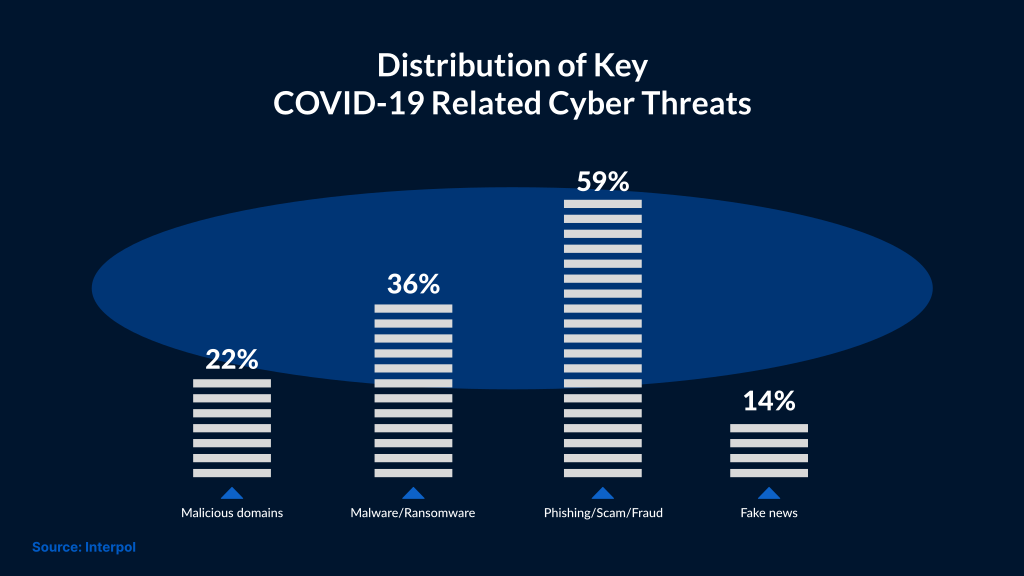
Attackers are using COVID-19-themed content to build trust and create urgency. Emails, websites, and messages are designed to appear legitimate, often impersonating trusted organizations or authorities.
Phishing and Social Engineering Scams
Security researchers have observed phishing campaigns that impersonate organizations such as the World Health Organization (WHO). In one example, users received emails containing links to COVID-19 safety-related documents. These links redirected users to malicious websites designed to capture login credentials.
In January 2020, phishing campaigns in Japan used emails disguised as communications from welfare services and public health organizations. These emails delivered Emotet malware, which is known for stealing sensitive information and enabling further attacks.
Similar campaigns were also observed in Italy, where phishing emails impersonating WHO officials attempted to distribute the Trickbot trojan, a malware commonly used to establish persistent access and support follow-on attacks.
In addition, a large number of fraudulent websites have emerged claiming to sell medical supplies such as face masks. These websites are often used to collect payment information or distribute malware, even when they appear legitimate.
How to Stay Safe and Combat Coronavirus Cyberattacks
Strengthen Basic Security Practices
As more users operate from home environments, maintaining basic security controls becomes critical. Home networks and personal devices often lack the same level of protection as enterprise systems.
Users should ensure that their home Wi-Fi is secured with a strong password and that default credentials are changed. Systems should have firewalls enabled, and operating systems and applications should be regularly updated to reduce exposure to known vulnerabilities.
Passwords should not be reused across multiple services. Where available, multi-factor authentication should be enabled to add an additional layer of protection, especially for email and business-critical applications.
Using a secure connection such as a VPN can help protect data in transit, particularly when accessing organizational resources from external networks.
Be Cautious with Emails and Online Activity
Cyberattacks during this period are mostly caused by phishing and social engineering. Therefore, it’s important for users to remain cautious when interacting with emails, links, and attachments, especially if they create a sense of urgency or request sensitive information.
Users should verify the sender first before clicking links directly. They can also navigate to official websites manually when possible. When installing software or signing up for services, users should check the authenticity of the source before proceeding.
A phishing email would have minor spelling errors, unfamiliar sender addresses, or lookalike domains. Users should treat any request for credentials or financial information with caution unless verified through a trusted channel.
Rely on Trusted Sources
Information about COVID-19 should be obtained from trusted sources like government health organizations or recognized institutions.
There are several fraudulent websites and online listings that may claim to offer medical supplies or critical updates. These websites collect payment details or deploy malicious software. Users should avoid engaging with unknown vendors or offers that appear unusually urgent or discounted.
Conclusion
The cybersecurity risks during the COVID-19 pandemic stem from the need to rapidly change systems and user behavior.
Access moved outside office networks. More users started working from home on personal or unmanaged devices. This made it harder for teams to see what was happening across systems.
Attackers used this shift. Phishing emails, malicious files, and fake websites increased as users looked for information and services online.
To handle this, teams need better visibility across endpoints and tighter control over how users access systems.
SafeAeon supports organizations in addressing these challenges by improving visibility, strengthening detection, and ensuring consistent responses across evolving environments.