

Key Takeaways
- Identity-based attacks account for around 30% of reported intrusions. Threat actors use phishing attacks and infostealing malware to steal credentials. (IBM X-Force Threat Intelligence)
- 70% of businesses will incorporate Identity Threat Detection and Response (ITDR) into their Privileged Access Management (PAM) strategies by 2026. (Gartner)
Introduction
There are numerous ways of carrying out cyberattacks. Identity is now one of the most common ways attackers gain access to systems. Instead of malware or exploits, attackers rely on stolen credentials or reused passwords. They abuse permissions to carry out sophisticated attacks that appear normal on the surface. Basic monitoring tools cannot detect these attacks.
Identity misuse is becoming more common. Many organizations now work across cloud services and remote access. More than one identity system is often in use. For MSPs, this adds complexity. Identity activity must be tracked across many client environments. Each client environment must remain separate. Early signs of misuse need to be noticed on time.
Without proper tools, a gap is created that attackers exploit to gain access to client environments. Managed ITDR helps close this gap. It is designed to monitor identity behavior not only at login but also afterward. It also adds security operations center (SOC) support for investigating and responding when something looks wrong. This helps MSPs detect identity threats earlier and respond more effectively.
What Does Managed ITDR Mean in Simple Terms?
Managed ITDR is a service that protects identities, not just systems. The role of this service is to monitor user and service accounts, as well as how admin roles are used over time. The goal is to identify behavior that does not match normal activity.
Basic identity alerts usually focus on single events. Managed ITDR takes a broader view. It looks at identity activity over a period of time. Sign-ins are reviewed first. Permission changes are checked next. Access behavior is also observed. When these actions do not align, misuse becomes easier to identify.
For MSPs, managed ITDR is more than just alert delivery. A SOC team reviews identity activity on an ongoing basis. Suspicious behavior is examined before any action is taken. This keeps the focus on real identity problems rather than routine alerts.
Why Identity Attacks Are Harder to Detect
Identity attacks are hard to spot because they use real accounts. There is no malware involved. Nothing breaks or crashes. Attackers make use of valid accounts to sign in.
Many identity systems raise suspicion when they detect clear failures. When a login is successful, it often receives little attention. Similarly, they won’t notice permission changes as long as they match allowed roles.
This creates gaps in visibility that attackers exploit. They get inside the environment and expand their access without being noticed. When security teams finally detect something unusual, attackers have already misused the access. This is why identity threats remain hidden for a longer period than other types of attacks.
What Managed ITDR Handles That Traditional Monitoring Does Not
Traditional monitoring looks at identity events in isolation. Logins and role changes are reviewed individually, whether they succeed or fail. This approach works for basic checks, but it often misses real attacks.
Managed ITDR fixes this problem by observing the entire sequence of events. It tracks the account’s behavior over time to identify the issue. Individual events, such as logging in from a new location or changing permissions, may not raise suspicion. But when these actions are viewed together, they form a pattern that requires immediate action.
MSPs using managed ITDR can view these patterns. They can see when a real account is not used in a normal way. This makes it easier for their SOC teams to catch problems.
What Identity Threats Managed ITDR is Built to Detect
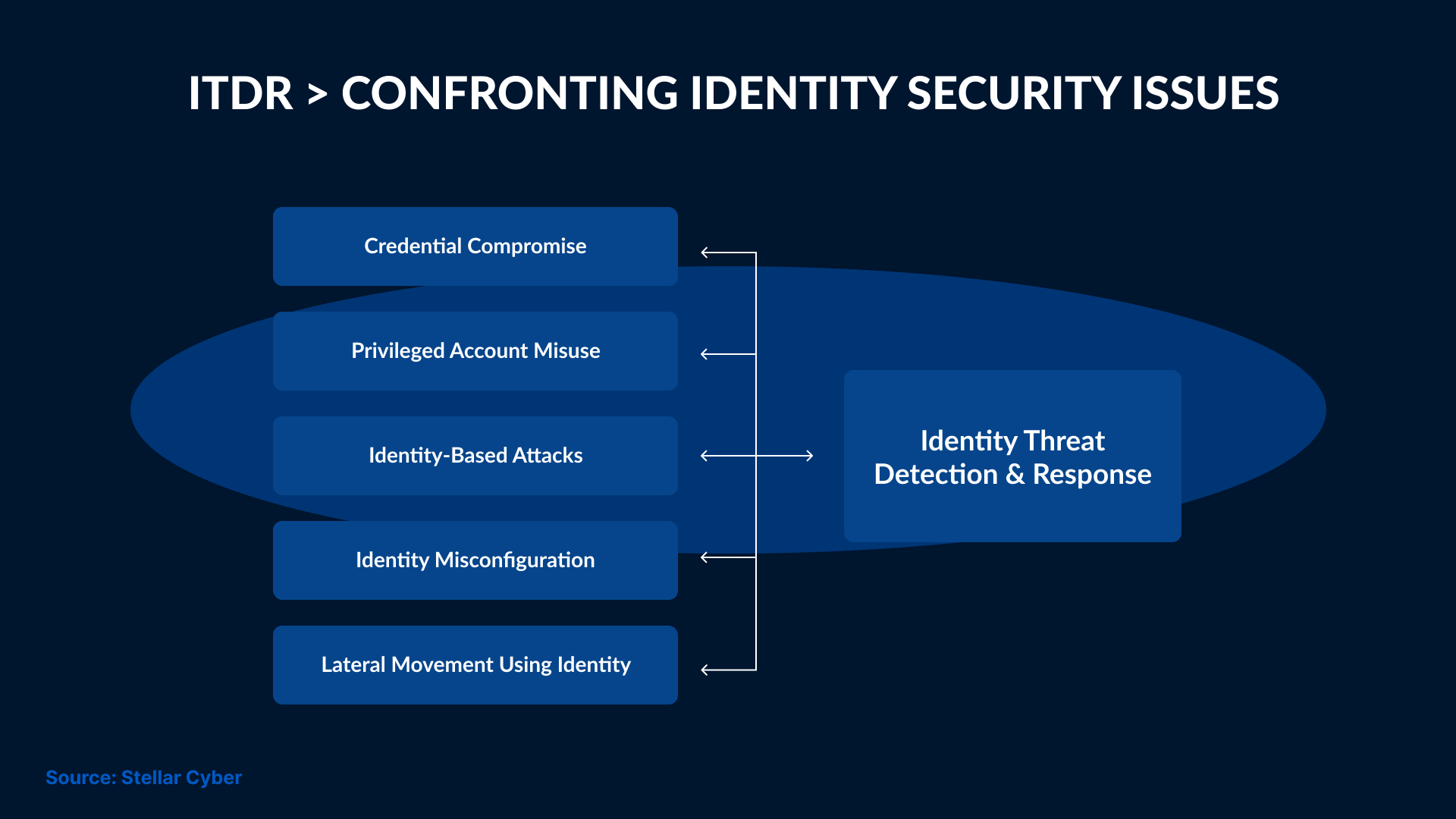
Managed ITDR is designed to identify threats that rely on valid access. These attacks occur without compromising security controls. Attackers use accounts that already exist. This makes them harder to notice with basic alerts. However, managed ITDR looks for these patterns. It monitors how identities are used after access has been gained. When activity does not align with the usual behavior, it is flagged for review.
In 2023, Okta's customer support system was breached by attackers. They compromised a service account using stolen login credentials. From there, they downloaded support files that contained active session tokens.
These tokens were then used to access customer environments without triggering MFA. In some cases, the attackers were able to act as administrators. This went on for nearly two weeks before it was noticed. Companies like Cloudflare and BeyondTrust were affected by this incident.
A managed ITDR approach may have flagged the unusual, automated queries used to harvest the HAR files. It would have detected session anomalies as well.
What Identity Data Managed ITDR Relies On
Managed ITDR monitors what an account does over time. A single login provides limited context. However, when several actions are seen together, it becomes easier to notice problems.
Sign-in Activity: This shows when and where access starts. It also shows how often an account is used.
Permission Changes: These records show when access levels change. They also explain how an account gets more control.
Session Activity: This shows the activity happening in a system after access is granted. It helps track continued use without new logins.
The data usually comes from identity systems and cloud services. When viewed together, it becomes easier to see problems.
How MSPs Track Identity Activity for Each Client
MSPs manage multiple client environments simultaneously. Each client has its own users and systems. Even identity setups vary from client to client. MSPs require broader visibility without mixing up the data.
Managed ITDR can help in this case by collecting identity activity from each client environment and keeping it isolated. Logs are not mixed. They review alerts for the right client, allowing them to spot issues without creating confusion or risk.
Over time, this helps MSPs understand what normal identity activity looks like for each client. When something changes in a client’s environment, it becomes clearer. It’s hard to achieve this kind of visibility with basic tools designed for single environments.
How Identity Threats Are Detected and Investigated by SOC Teams
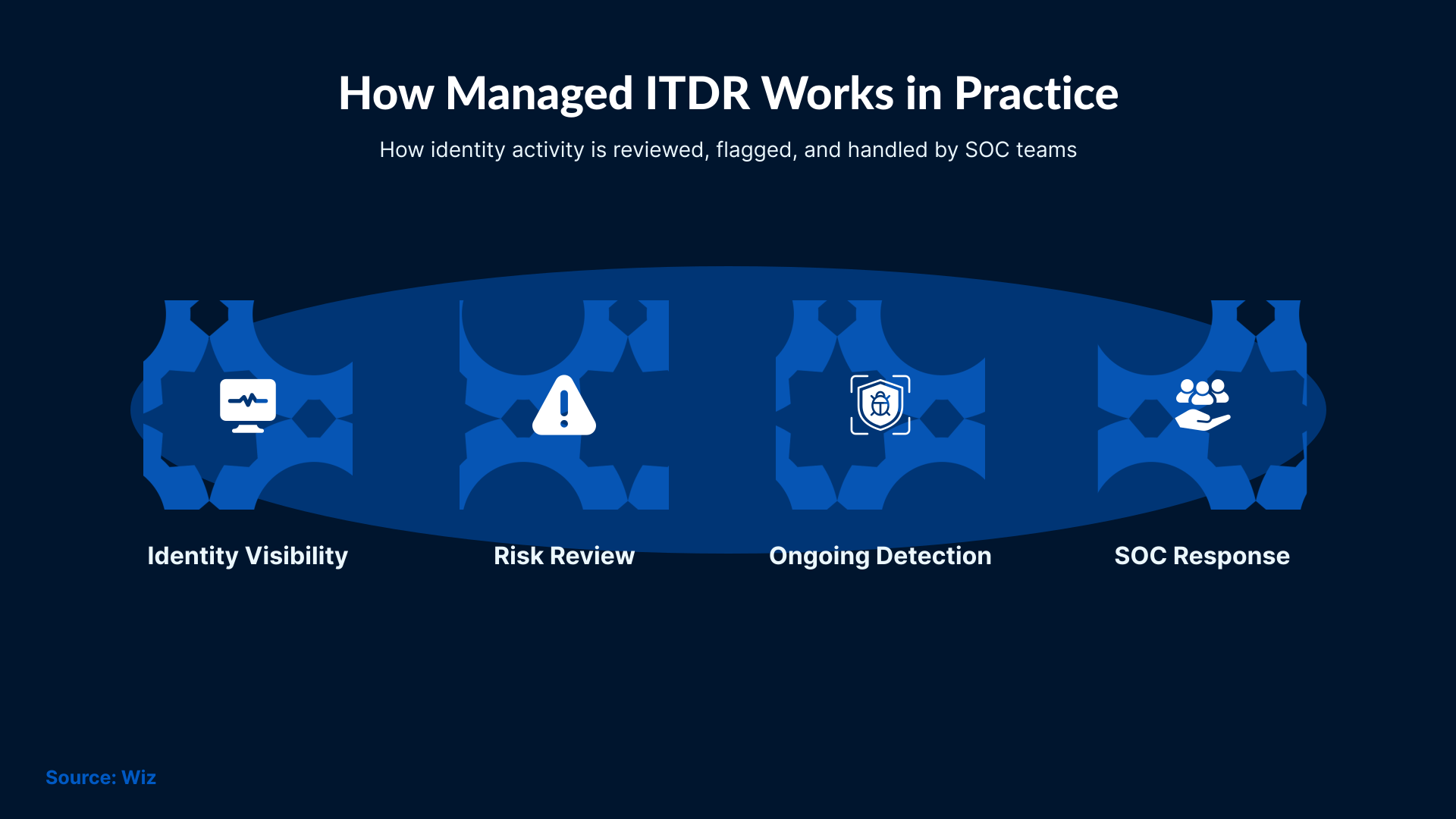
SOC teams monitor identity activity in real time. They identify patterns that don’t look normal for an account. This includes signing into a system at odd hours or from unfamiliar locations.
Once analysts spot anything unusual, they start reviewing surrounding activities. They check everything that happened before and after that particular event.
This process is used to determine whether the activity was part of normal work. SOC teams review identity behavior over time to decide if it requires action.
How SOC Teams Respond to Identity Threats in Real Situations
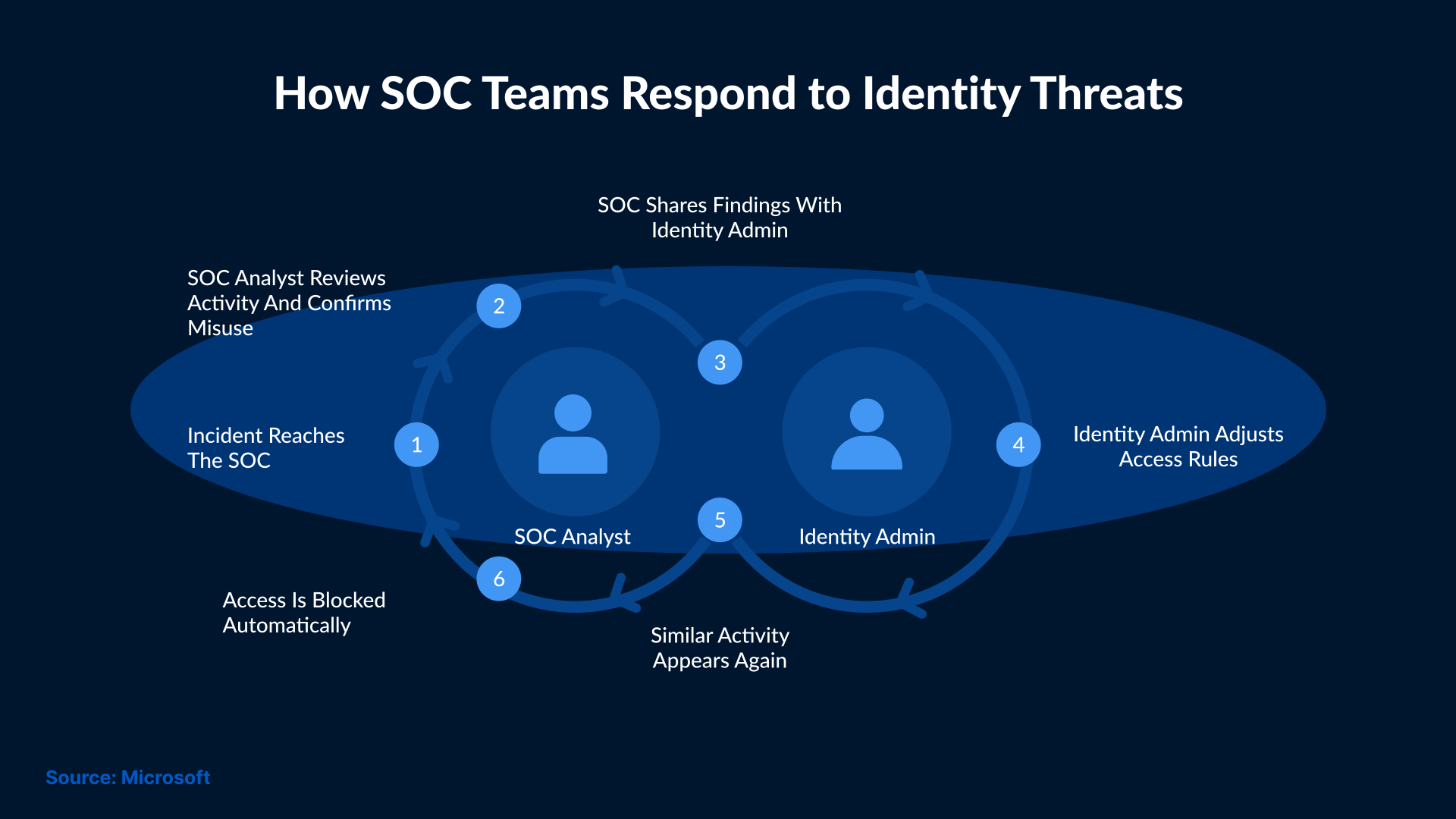
When an issue stands out, the SOC team takes a closer look at the activities surrounding it. They review what the account was doing before and after the alert. This helps them decide whether the activity is normal.
If the behavior appears risky, SOC teams restrict system access. This will prevent unauthorized access and ensure there is no disruption to normal operations.
Then, the SOC teams review how attackers gained access to the system. They document the entire incident and share the details with the MSP or client. This helps prevent the same issue from happening again.
What To Look for in A Managed Identity Security Service
A managed identity security service should be easy to work with. It should fit into the ongoing operations of an MSP. It should be easy to set up and provide clear alerts. Otherwise, it adds complexity.
- Visibility: This is the first thing to look for in a managed ITDR. It should clearly show identity activity for each client. It should also keep data of each client separate. MSPs should be able to determine which environment an alert belongs to.
- Alert Handling: The next thing to check is how alerts are handled. Analysts, not tools, should review alerts. A SOC team should confirm whether something is a real issue before escalation.
- Response Support: The service should guide the next plan of action. Whether it includes session control or permission cleanup, it’s important to have clear communication between the service and the MSP.
- Reporting: Reports should explain everything about the incident in plain language. They should help MSPs convey the information to clients without any confusion.
What Changes After Managed ITDR Is Fully in Place
Managed ITDR provides MSPs with clearer visibility into daily identity activity and changes in client environments.
SOC teams will no longer spend hours checking routine events. Instead, they can focus on accounts that are behaving differently than usual.
It also helps improve communication with clients. MSPs can explain identity issues with clear context rather than just providing alert details.
Teams catch identity issues earlier and address them during daily work. This makes identity checks part of everyday work in the long run.
Conclusion
Identity attacks happen often. They look like normal activity and can stay hidden for a long time. Basic alerts usually do not catch them. But managed ITDR can provide MSPs with a clearer path to deal with this problem. This solution focuses on how identities are used rather than on whether the access was successful.
With the right data and ongoing SOC support, identity misuse can be easily spotted and handled. SafeAeon managed ITDR is designed using this approach. It helps MSPs maintain clear identity visibility across client environments. The service keeps each client’s data separate. It helps MSPs spot identity misuse early and act before important activity is missed.