


Key Takeaways
- Modern apps are mostly API driven, yet 94% of companies experienced API incidents in 2023. API testing is not optional; it's mandatory.
- IBM’s 2023 Cost of a Data Breach Report showed that early detection can save up to 60% in remediation costs. But continuous testing must be done.
- Ransomware accounted for 23% of the breaches in Verizon’s 2024 DBIR. It shows the importance of continuous security validation.
Introduction to Web Application Security Testing
When most people think of ‘web security’, they imagine a dark room with hackers diligently working on their systems, cracking codes to get access to websites and apps. But the reality is quite different. Most security breaches happen due to simple oversights, especially during security testing.
Verizon’s 2024 Data Breach Investigations Report found that 68% of all the data breaches involved a human element in the form of an error during system configuration and testing, clicking a phishing link, misuse of privileges, etc. To overcome vulnerabilities, web application security testing is carried out before attackers can exploit the system. But what if the testing itself is flawed?
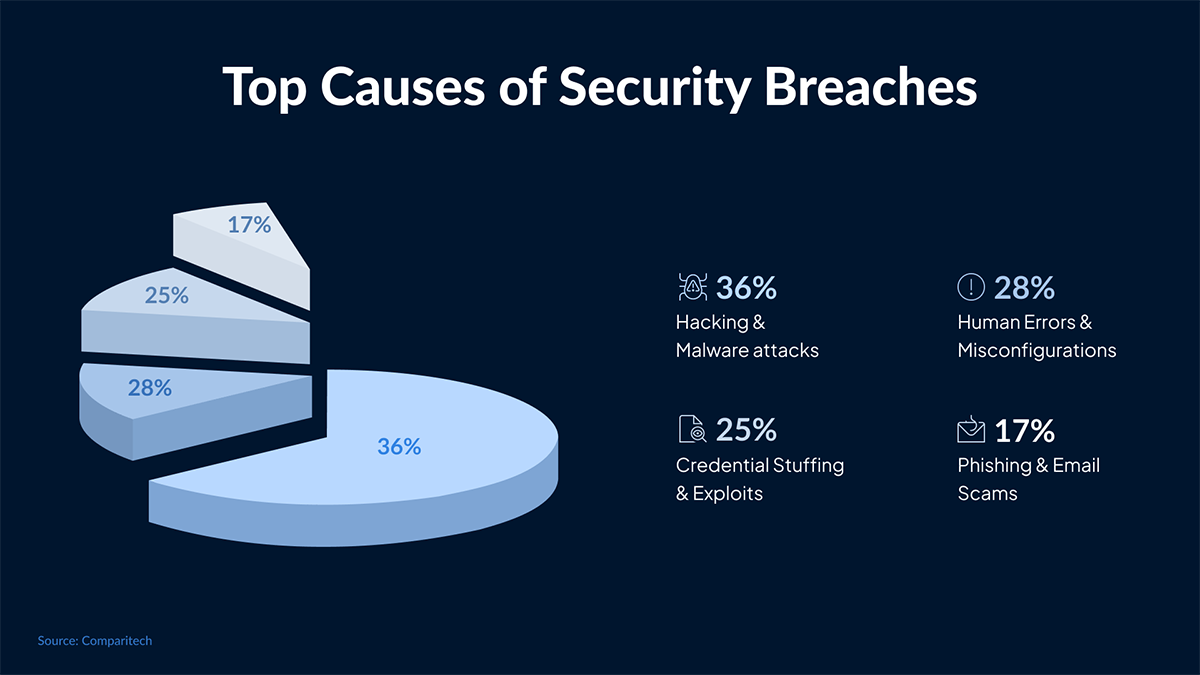
Today, we will shed light on 10 common but costly mistakes that even experienced teams make. Whether you’re a developer, founder, or project manager with little tech background, you will be able to understand these mistakes clearly. Then, you have a clear idea of what to avoid during the application security testing.
Why Testing Only the Login Page of a Web Application is Risky
Most teams are focusing on login forms, checking for weak passwords, or brute-force protection. However, attackers rarely go through the front door.
In a 2023 breach, attackers exploited a forgotten ‘feedback form’ to upload malicious scripts. They bypassed all authentication mechanisms in the process.
How to Fix it?
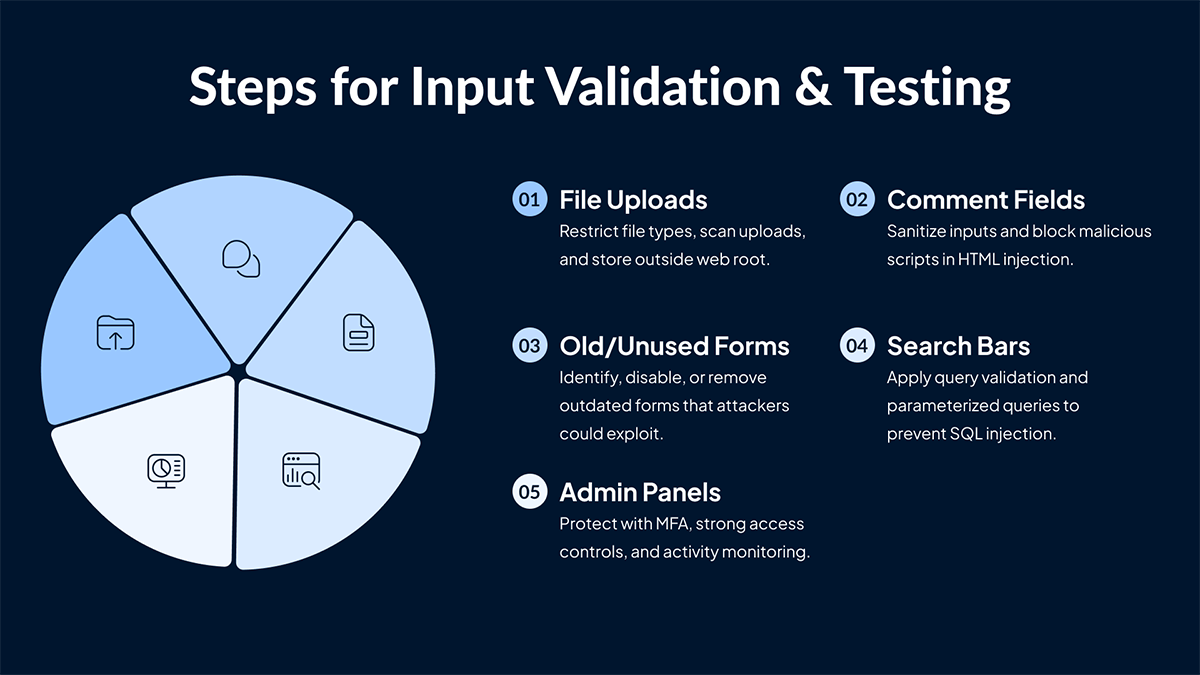
Attackers are most likely to penetrate through these ‘side doors’ instead of the login page. You must focus on finding all the inputs, validating data, restricting uploads, enforcing least privilege, and monitoring logs for anomalies.
How Is Ignoring Business Logic Vulnerabilities Risky
Business logic flaws don’t show up in code scanners. But they must be fixed because if not, they exploit gaps in how features are meant to work.
Example: An e-commerce company has a payment system where users can apply promo codes. Any tweak in the request parameters can allow them to apply promo codes repeatedly, causing significant financial damage to the company.
How to Fix it?
Perform abuse-case testing to find potential loopholes:
- Can users skip payment steps?
- Can they change user IDs in requests?
- What happens if you replay requests?
Think like a user trying to cheat the system to be able to find a solution.
Limitations of Relying Solely on Automated Security Scanners
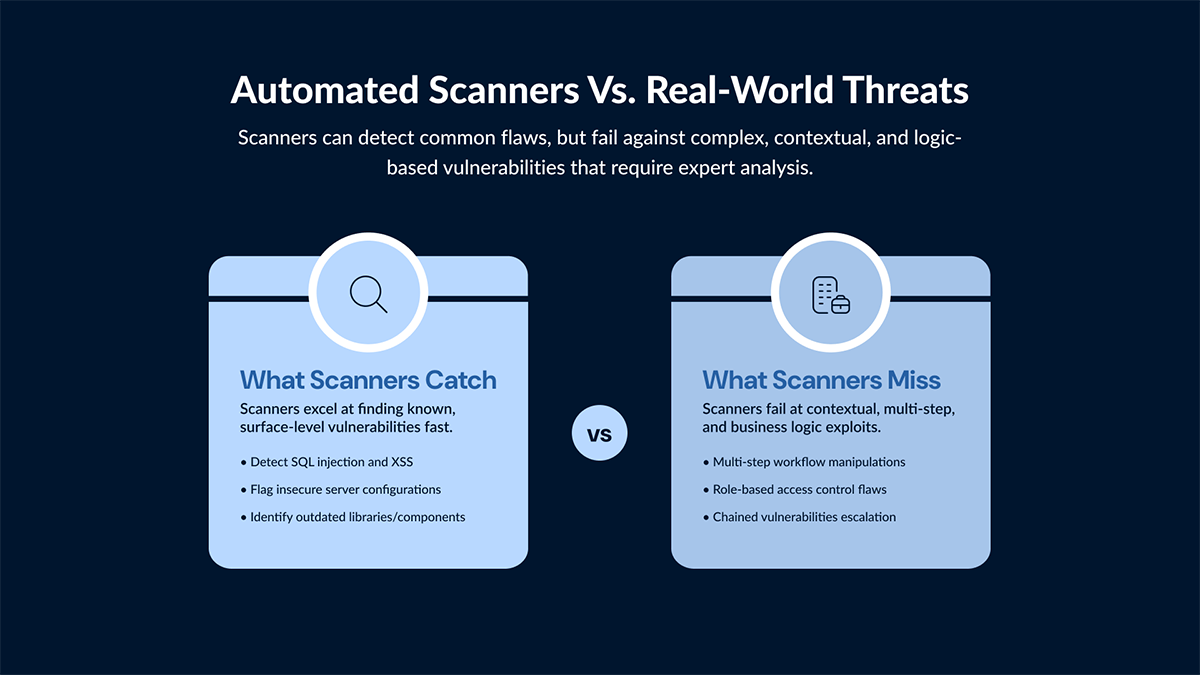
For surface-level issues, you can rely on tools like OWASP ZAP, Nikto, or Nessus, but they won’t help you if the problem becomes more complex.
Scanners miss chained exploits that require multi-step logic, session manipulation, or role abuse.
How to Fix it?
You can use scanners to baseline all the known issues. Then, you need to test manually for:
- Multi-step flows (like user onboarding)
- Role switching
- Broken session handling
- Hidden fields or tokens
Keep in mind that scanners are just tools, not strategies. Experts are needed to create strategies for successful web application security testing.
Not Testing Access Control of Web Apps Properly
When it comes to the most exploited flaws in modern apps, access control issues take the top spot. They appear due to poor backend enforcement.
A typical example of this would be a fintech app, which exposed user balances via a mobile API. The reason it did that was that it didn’t verify if the logged-in user was authorized to view the data.
How to Fix it?
- Test APIs by changing IDs or tokens (user_id=1234 → 1235)
- Attempt admin actions as a regular user
- Enforce all permissions on the server, not just the frontend
How Ignoring API Endpoints in Security Testing is Risky
Many web application security tests focus only on the UI, overlooking the fact that modern apps are API-first. This results in flawed testing. For example, an e-commerce platform may limit orders to five items on the frontend but allow bulk orders through the API, causing the inventory system to crash.
How to Fix it?
- Include API testing in your standard security process
- Use tools like Postman, Burp Suite, or Insomnia to:
- Send malformed inputs
- Test rate limiting
- Bypass UI logic
You need to treat APIs as first-class attack surfaces.
Delaying Security Testing Until the Final Stage of Development
Security is often treated like a post-launch task. That’s where the problem lies because when it’s too late, it becomes too expensive to fix the root problems.
Why does it fail?
If there are flaws in the design, such as insecure workflows or privilege escalation paths, then it can’t be fixed by applying patches late in development. It requires in-depth web application security testing.
How to Fix it?
- Integrate “security as code” from day one
- Use tools like:
- SAST (Static Application Security Testing) during development
- Threat modeling during design
- Secure coding checklists in code reviews
Shift left. Build security into every sprint.
How Trusting Third-Party Integrations Without Testing Creates Vulnerabilities
Failing to test third-party plugins, libraries, or CDNs is another major reason for security breaches. These third-party integrations leave serious backdoors open for attackers.
Example: The Magecart attacks injected malicious code into a compromised third-party JS library. It affected thousands of e-commerce sites and put a huge dent in their finances.
How to Fix it?
- Use Subresource Integrity (SRI) for external scripts
- Regularly run dependency scans (npm audit, OWASP Dependency-Check)
- Remove unused packages and lock versions to avoid unexpected updates
Why Frontend Validation Alone Cannot Secure Your Web Application
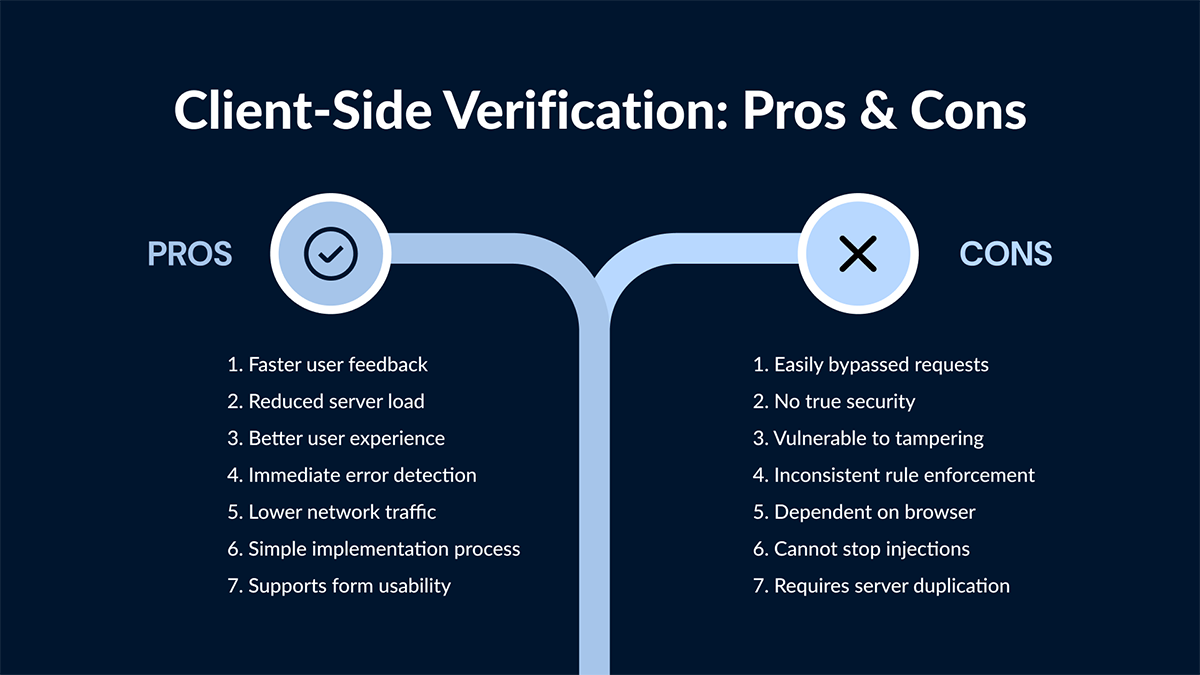
Client-side validation, such as JavaScript form checks, is for UX, not security. Attackers won’t be using your forms. They will send direct requests using curl, Burp Suite, or scripts, bypassing all the frontend controls.
How to Fix it?
- Validate everything on the server
- Use allowlists, but explicitly define what is allowed
- For APIs, implement JSON Schema validation using libraries like Joi or Yup
How Overlooking Security Misconfigurations Puts Your App at Risk
Security issues often lie not in the code, but in the server, deployment or cloud config. Here are some common examples of security misconfigurations
- AWS S3 buckets exposed to the public
- Debug mode enabled in production
- .env files accidentally committed
How to Fix it?
- Run cloud config audits using tools like:
- ScoutSuite, Prowler, Trivy
- Use IaC security scanners (e.g., Checkov, TFSec)
- Include config checks in your CI/CD pipeline
Importance of Security Testing After Every Web Application Update
Every time a new feature is added to the app or a bug is fixed, new security risks arise. Yet, many teams ignore retesting them properly, and that’s where they let the guard down.
Example: A SaaS product added a "duplicate workspace" feature that copied over admin-only data to regular users. This exposed all the system settings, allowing attackers easy access to penetrate the system.
How to Fix it?
- Treat every new feature as a security event
- Maintain a security regression test suite
- Integrate security testing into your CI/CD pipeline
Conclusion
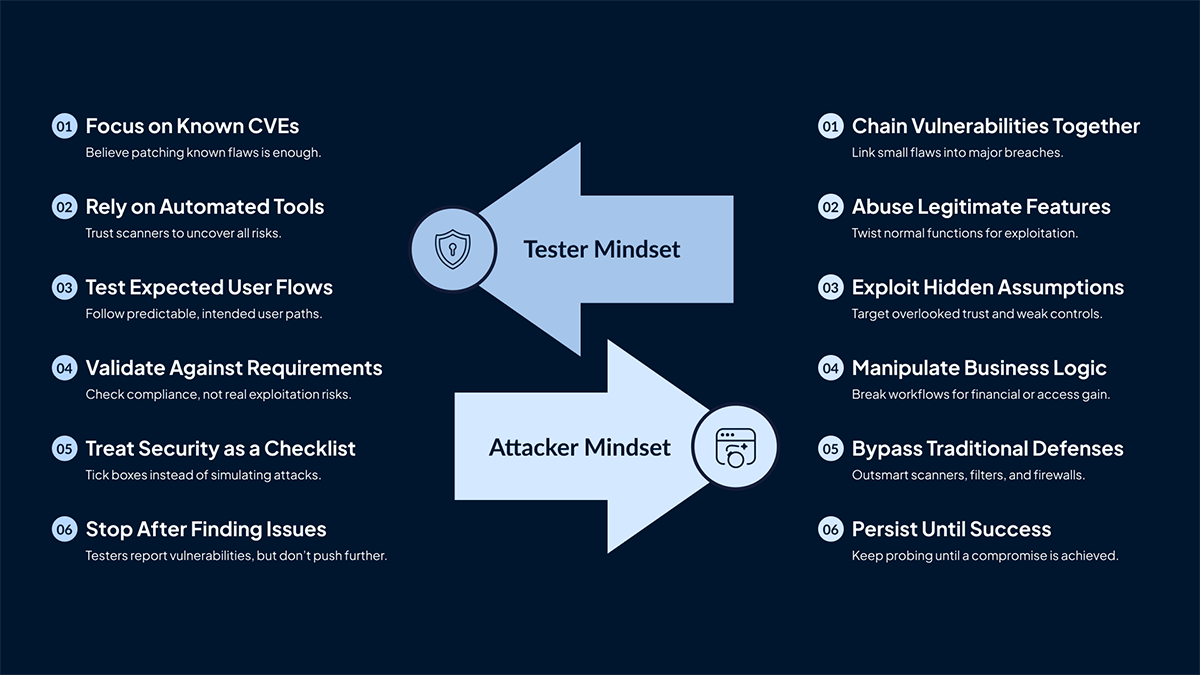
Teams need to understand that skipping a test is not the biggest mistake they make. It’s testing with the wrong mindset. Test the system with the mindset of a hacker. This would include finding vulnerabilities across features, abusing legitimate functions of the application, and challenging the assumptions that testers would take for granted.
Checking known CVEs won’t secure the applications. What’s required is the mindset of a hacker who wants to break the system at any cost. You can contact SafeAeon to get a comprehensive web application security testing done for all your web apps.