

Key Takeaways
- A Dark Reading/Qualys cloud and SaaS security survey found that 28% of organizations experienced a cloud or SaaS-related data breach in the past year, and 36% of those affected were hit more than once.
- A 2024 CSA report found that SaaS security teams still struggle with visibility and control, with 65% reporting difficulty tracking third-party connected app risks and 65% struggling to fix SaaS misconfigurations.
Introduction
Software as a Service (SaaS) has changed the way businesses use applications. With SaaS tools, teams can work from anywhere in the world as long as there is a stable internet connection. These tools also help businesses scale without managing the full application infrastructure.
SaaS applications are cloud-based, making them convenient for users and SaaS providers alike. But it’s important for organizations to ensure the security of these apps, especially as more are integrated into workflows. This has led to the rise of the concept of SaaS security.
As cybercrime continues to grow, the risk of unauthorized access, misconfigurations, account takeover, and data exposure has also increased. SaaS security helps protect business data, user accounts, and application settings from these common risks.
Organizations need robust SaaS security strategies due to the widespread use of SaaS applications in day-to-day business operations.
Key Components of SaaS Security
There are some key components that must work together to ensure SaaS security. Here are details of what those components are:
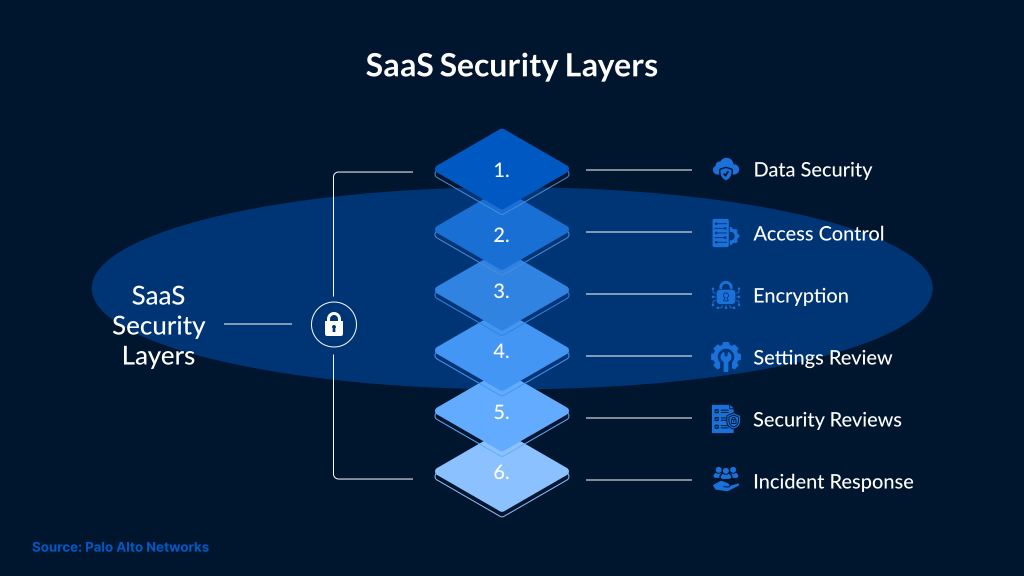
- Data Security: Data security protects sensitive business data inside SaaS applications. It also helps reduce the exposure of data while it is stored or shared.
- Access Control: Access control decides who can use each SaaS application. It also limits what users can do after they sign in.
- Encryption: Encryption protects data when it moves between the user and the application. It also protects data when it is stored.
- Settings Review: SaaS applications often include sharing settings. It's important to review these settings, as a single incorrect setting can lead to data exposure.
- Security Reviews: Regular reviews help check whether the SaaS application is still secure. They can also show weak access rules before they become a larger risk.
- Incident Response: Incident response gives teams a clear process to follow in case there is a security breach. This allows them to respond faster to any security incident.
All these components work together. Without access control, data protection can become weaker. And access control becomes weaker when settings are not reviewed. This is why SaaS security needs regular checks.
Why Is SaaS Security Important?
SaaS solutions offer many benefits. They are accessible from different locations. They also support business growth without the need for heavy infrastructure management.
These benefits also create security risks. Employees may use SaaS applications that are not approved or managed by the company. When this happens, business data may be exposed outside approved systems.
SaaS security helps protect an organization’s SaaS environment from security threats. It improves visibility into SaaS usage, including shadow IT. It also helps ensure that applications are configured securely.
What Makes SaaS Applications Risky?
Shared Responsibility
SaaS providers only manage the core application and platform. Customers will be responsible for tasks such as managing access, data use, integrations, and settings. When responsibility is shared between users and SaaS providers, it creates security gaps. While the SaaS provider may secure the platform, the customer can still expose data through poor access control or weak settings.
Identity and Access Management
Users can access multiple SaaS applications using Single Sign-On (SSO). It also allows teams to manage access from one place.
However, the growing number of SaaS applications has made identity management a bit harder. Users now may have more access than they need. In some cases, accounts remain active even after an employee leaves.
This is the reason why strong identity controls are needed for SaaS security. These controls should include role-based access, MFA, and regular access reviews.
Provider Security Standards
SaaS security can vary from provider to provider. Some providers follow strong security practices, while others may have weaker controls or limited assurance documentation. In such cases, standards such as ISO 27001 and SOC 2 can help customers review the security provided by the SaaS provider. But these standards do not cover every risk. So, businesses must manually review how the provider protects the data. They should check how the provider manages access and handles security incidents.
Limited Visibility
A SaaS provider manages security at the backend, so customers may not always see and understand how data is protected. A lack of transparency can be a concern. So, it’s important for customers to review security documentation and audit reports. For further clarity, they can also check service commitments and data protection practices before choosing a SaaS provider.
Data Location
SaaS providers may store customer data in different regions. This can affect the compliance and performance of the SaaS applications. Even data access requirements change when data is stored in different regions.
Some organizations may need data to stay within a specific country or region. This depends on business requirements and regulatory obligations.
Access From Anywhere
Customers can access SaaS applications from different locations. This improves flexibility, but at the same time, increases security risk.
In case the app is accessed on a compromised device, it can expose login credentials. Similarly, accessing the app on an unsafe network can increase the risk of session theft or unauthorized access.
Data Control
Customers don't always have full control over how data is stored and managed in SaaS applications. For platform-level protection, customers depend on SaaS providers.
This makes data ownership and access control important. Organizations should understand who can access their data. They should also review how data can be changed, exported, or shared.
Common SaaS Security Challenges
There are a few security issues with SaaS applications that teams must address to ensure comprehensive SaaS security.
- Account Takeover (ATO): ATO happens when an attacker gains access to a user account. It can begin with stolen credentials. It can also happen when attackers abuse OAuth access. Session hijacking can also lead to account takeover.
- Data Exposure or Data Loss: Account takeover can expose data in SaaS applications. Misconfigured settings can also make data accessible to the wrong users. Shadow IT can create additional risk because IT teams may not know where business data is stored.
- Phishing: Phishing attacks can impersonate trusted SaaS applications. Fake login pages can trick users into entering their credentials. This can lead to account takeover.
- Malware Delivery: File-sharing services can be misused to deliver malware. Attackers may also use trusted SaaS links to make malicious content look safer.
- Denial of Service (DoS): DoS attacks can affect SaaS applications that are used in daily business operations. As a result, employees won't be able to access important services.
- Compliance Risk: Regulations such as GDPR can affect how data is stored, processed, and transferred. Unauthorized SaaS use can create compliance risk if business data is stored in unapproved locations.
Best Practices for SaaS Security
Companies should follow these best practices to keep their SaaS applications secure:
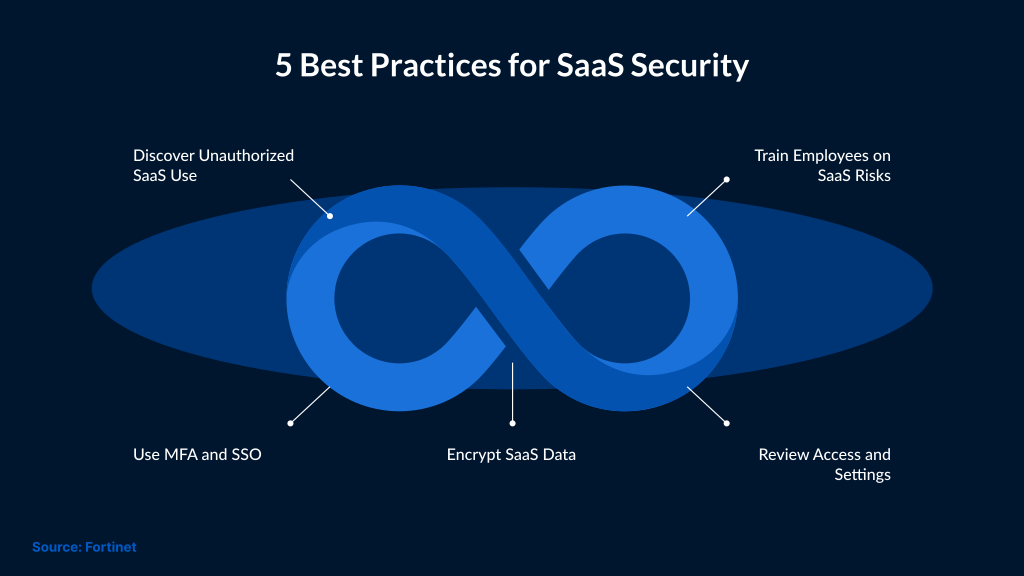
Automated Discovery: SaaS usage can change quickly. IT teams may not always know which applications employees are using. In such scenarios, automated discovery tools can help teams find unauthorized SaaS use.
User Education: Employee actions can affect SaaS security. So, it’s important for organizations to provide employee training to help them understand phishing risks. They also learn best practices to keep data and passwords safe.
Multi-Factor Authentication: MFA adds an extra layer of protection for SaaS accounts. Teams can also consider implementing Single Sign-On (SSO), which allows them to manage access from a single location.
Data Encryption: Encryption protects data while it is stored. It also protects data while it is being transmitted.
Security Assessments: Regular assessments help teams identify security gaps in SaaS applications. These gaps are mostly in the form of misconfigured settings, weak access rules, and unnecessary user permissions.
How to Choose the Right SaaS Security Service
Some important things to look for in a SaaS security service are:
- Discovery: It is important to identify all SaaS applications being used across the business. A SaaS security service should help identify applications by analyzing gateway logs, signup emails, API integrations, and endpoint activity.
- API Security for Approved Applications: API access can help review approved SaaS applications. It can also help check whether those applications are configured securely.
- Inline App Security for Unmanaged Applications: With inline security, teams can review application traffic. It also helps reduce risk for applications that don’t support API integration.
- SaaS Security Posture Management (SSPM): SSPM can help review SaaS configurations and permissions. Teams can also review security settings and identify any risky settings before they create exposure.
- Automated Detection and Response: With automation, suspicious activity can be detected faster, which allows security teams to respond to SaaS risks more consistently.
Conclusion
SaaS security is important for protecting cloud-based applications and sensitive business data. The rising demand for SaaS tools makes them a lucrative target for cybercriminals. So, organizations must consider getting better control over access, settings, and data exposure.
The extensive use of SaaS tools has also increased the risk. To mitigate the risk, strong security controls must be implemented, including multi-factor authentication, encryption, and secure configuration. Organizations must also follow Zero Trust principles and understand the shared responsibility model. SaaS providers manage the core application and platform. Users, permissions, integrations, and data access need to be managed by customers.
Organizations can reduce SaaS security risks by regularly reviewing their applications. They should also monitor suspicious activity and follow security best practices. SafeAeon helps organizations assess SaaS security risks, improve visibility, and strengthen controls across cloud-based applications.