

Key Takeaways
- RPO is always measured in time. An RPO of 30 minutes means that a system must be backed up every 30 minutes to ensure data loss of not more than 30 minutes in a disaster.
- Financial institutions have the lowest RPO among all industries, i.e., 0 to 1 hour.
- RPO is often tiered based on data criticality – low, medium, and high.
Introduction
Every business expects smooth operations without any downtime and data loss. But that happens only in a perfect world. In the real world, systems go down and data gets lost, forcing teams to work on recovery plans. But how do recovery plans work? For that, it’s important to understand Recovery Point Objective (RPO), a key part of any disaster recovery or business continuity strategy.
Whether you are beginning with disaster recovery planning or further strengthening your current approach, this guide will help break down what RPO means, why it’s important, and how to choose the right target for your business.
What is Recovery Point Objective (RPO)
Disaster Recovery (DR) plays an essential role in business continuity planning. It focuses on the potential to restore the IT infrastructure to its operational state after an unplanned service interruption, which could be a power outage, security-related incident, or application crash.
An unplanned service interruption can cause data loss if no backup exists. A Recovery Point Objective (RPO) indicates the maximum acceptable amount of data loss after a sudden service interruption. An RPO is measured in time (seconds, minutes, and hours).
According to IBM’s Disaster Recovery Documentation, RPO defines how much data a business can afford to lose during an outage. This serves as a key metric in planning backup and replication strategies.
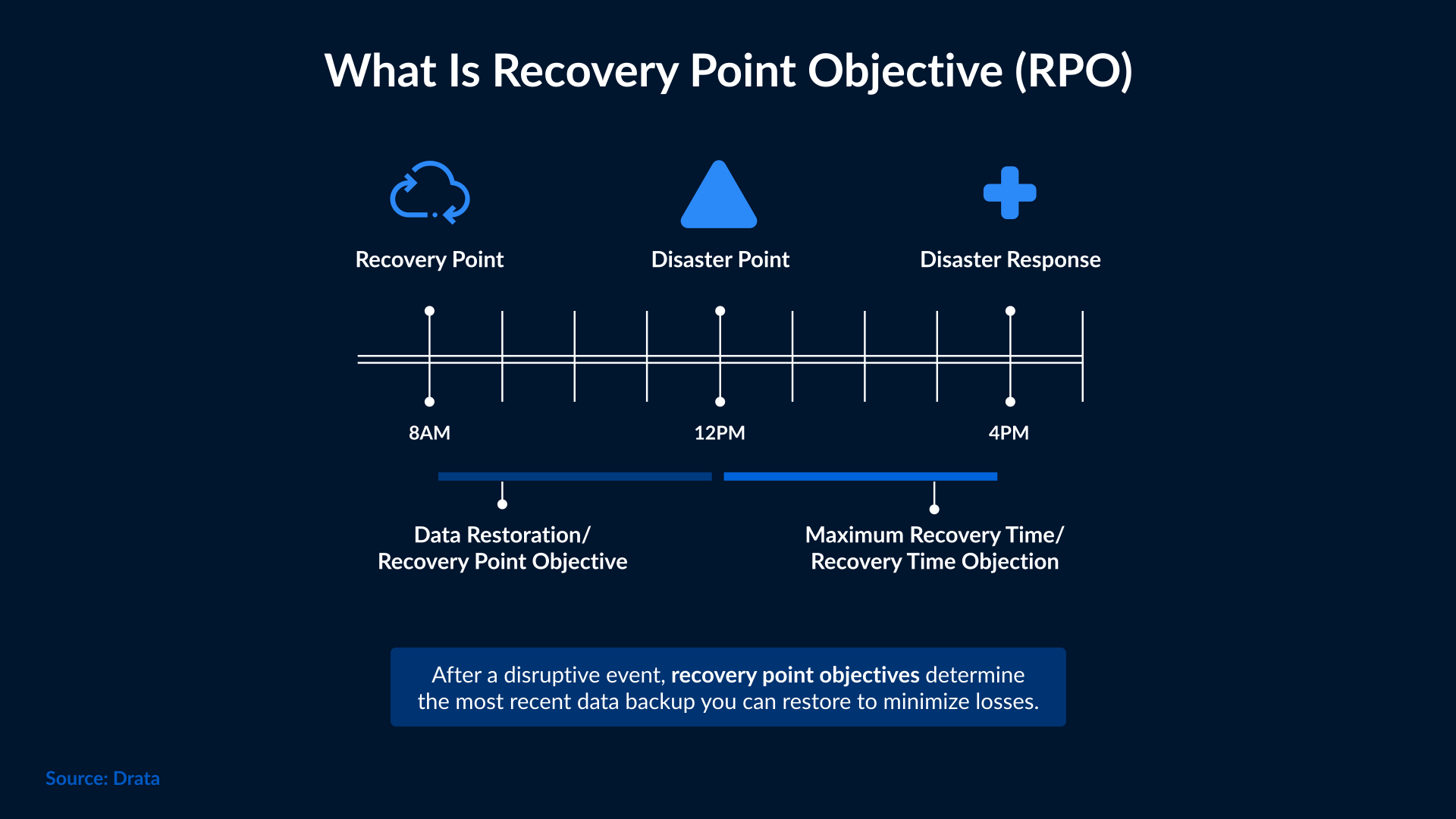
RPOs are established in disaster recovery planning to implement data backup or replication processes, which can prevent unacceptable data loss in the event of a sudden downtime. To determine the acceptable data loss for a given application or service, certain factors are taken into consideration, such as:
- Critical level of data
- Frequency of changes or updates in the data
- Regulatory and compliance requirements
- Customer needs
RPO vs RTO: Key Differences
Both RPO and RTO are the two key parameters of a disaster recovery or data recovery plan. They define business requirements and targets for recovering critical IT systems after a sudden service interruption.
An RPO indicates how many hours of data could be lost in a service interruption while avoiding severe consequences for the business. Let’s assume an application or service has an RPO of 2 hours, which means the company has agreed to accept up to 2 hours of data loss in case of a service outage. To meet this objective, the enterprise will back up data from that application every 2 hours.
On the other hand, a Recovery Time Objective (RTO) represents the targeted time frame to restore a certain application or service after a service disruption.
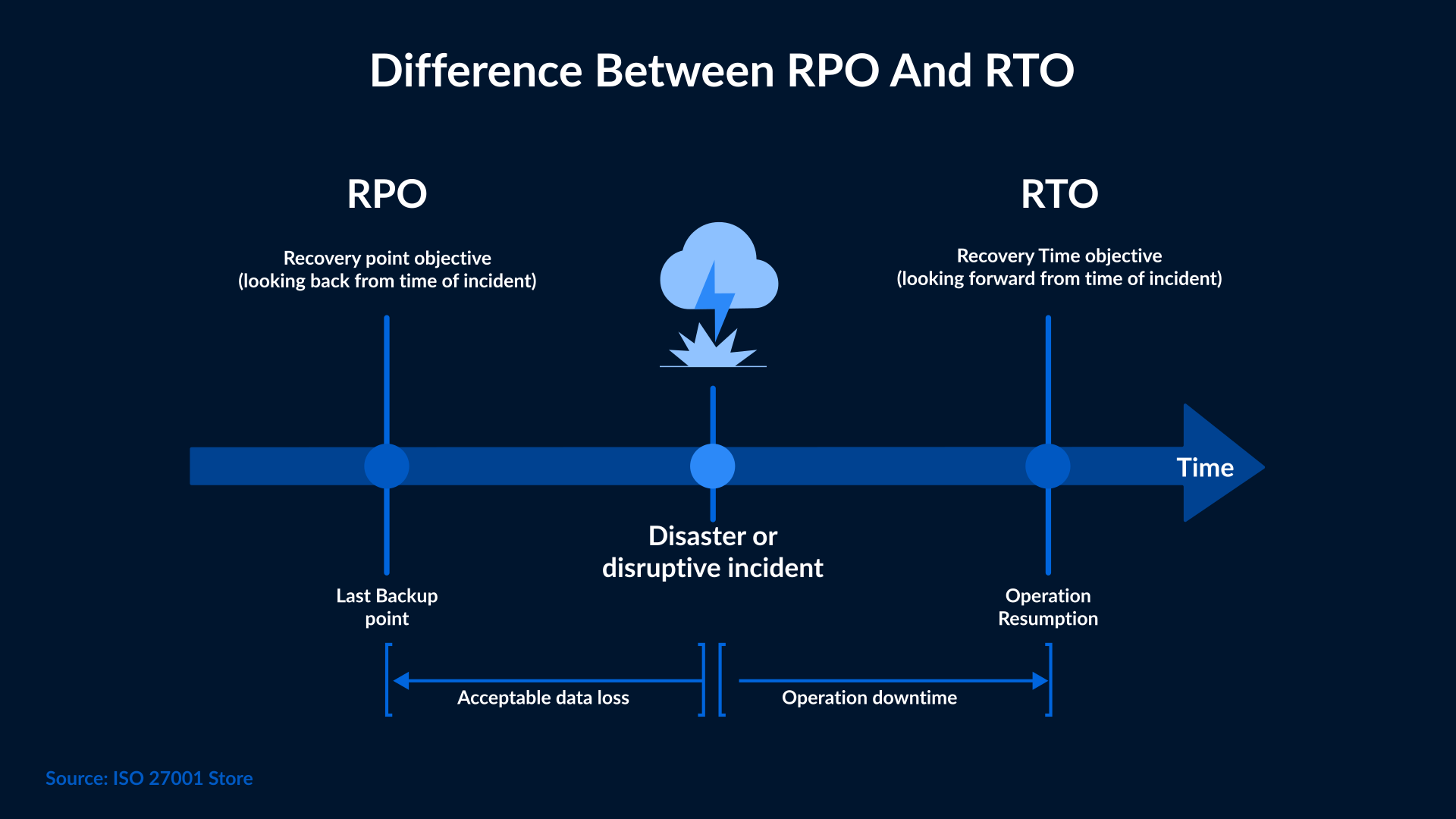
An RTO of 2 hours means the organization must get the services running again within 2 hours after an outage to prevent a serious impact on operations. Meeting RTO objectives involves setting up failover and failback processes within the disaster recovery plan.
Why RPO is Critical for Organizations
Choosing the right RPO for your business will help pinpoint the recovery time objective (RTO) as well. You can also determine the type of backup service you need and how frequently to use it. Having a backup and recovery plan with the RPO in mind can prevent excessive data loss, reduce recovery costs, and improve the continuity of your business.
Disaster Recovery Planning and Strategy
The main purpose of setting RPOs is to plan how your business will recover after a disaster. It helps teams see how data loss affects critical systems, how often they should back up data, and where to use tools that keep critical information safe.
Avoiding Unacceptable Data Loss
RPOs are established to avoid negative consequences of unacceptable data loss, which include things like:
- Dissatisfied customers
- Customer litigation
- Lost productivity and/or business efficiency
- Lost revenue
- SLA violations
- Regulatory and compliance violations
How to Define and Calculate RPO
RPOs look back from the moment of disruption to the last usable backup point. They also measure the frequency of data backup.
RPOs are usually measured in minutes or hours, but for critical systems, they may be set in seconds. In some cases, RPOs have been calculated in days as well. An RPO determines how far back you must go to recover data and resume normal operations after a service disruption.
In short, RPO helps you decide how often you should back up your files so your business can recover quickly without losing too much information.
For example, if a computer system has an RPO of 30 minutes, that means it could lose up to 30 minutes of data following a disruption, so you must back up the system every 30 minutes.
Factors That Influence RPO Targets
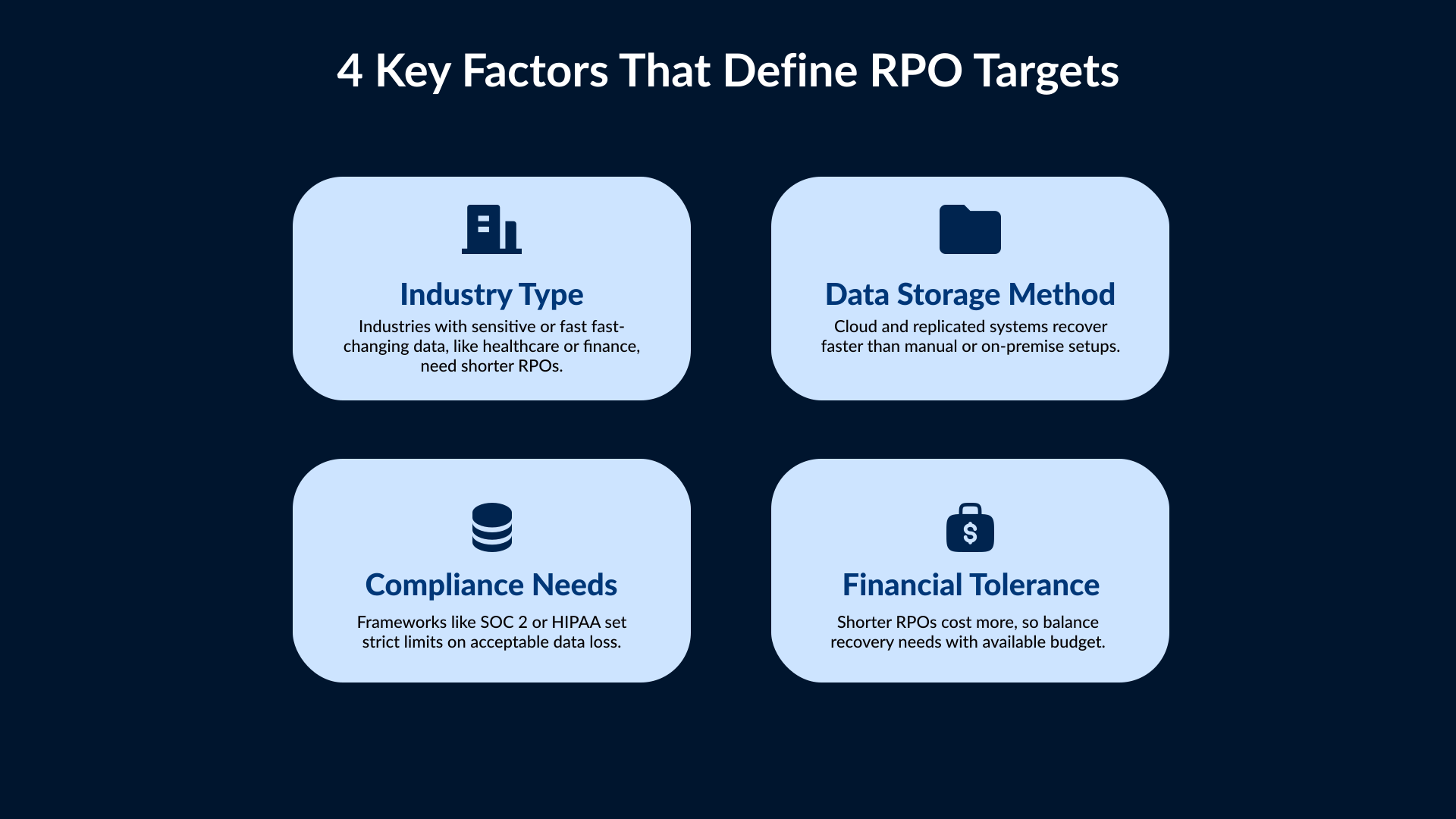
Good RPOs form the base of a strong business recovery plan. They help set clear limits on how much data each system or department can afford to lose. These limits depend on different factors that affect how valuable your data is. Here are the things you must consider while setting RPOs.
Industry: Enterprises dealing with highly sensitive or dynamic information must update their files more frequently than others. Industries such as Healthcare organizations and financial institutions fall into this category.
Data Storage: The way data is stored in physical storage devices or the cloud can determine how quickly it can be retrieved after a service disruption.
Compliance Considerations: Several compliance schemes contain clauses related to disaster recovery and data availability. For example, SOC 2 certification expects businesses to keep their data accessible and accurate, which limits the amount of information they can afford to lose during an outage.
Financial Tolerance: When deciding how much data loss you can handle, compare the cost of setting your RPO with the amount you might lose if recovery takes too long. A shorter RPO may cost more initially, but it can save you money in the long run.
Strategies and Technologies to Meet RPO Goals
Meeting your RPO goals depends on how you back up and protect data. Many businesses today are using automated backups or real-time replication to reduce data loss. Cloud storage services make it easier to copy data across multiple locations. For critical systems, continuous data protection (CDP) can be used to record every change as it happens. This helps maintain near-zero data loss. If you combine reliable backup tools with strong monitoring, you can ensure that data stays recoverable even when systems fail unexpectedly.
Challenges and Trade-offs in Achieving Low RPOs
Setting short RPOs may sound like a great move, but it has its own set of challenges. You will need high-speed storage and extra bandwidth. Moreover, you will have to take backups frequently. In case you are using old systems, then they may not support fast recovery methods. It’s important to balance cost and practicality, which you can do by matching RPO goals with the true importance of your data instead of targeting the shortest window possible.
Best Practices to Maintain and Test RPO
An RPO is only useful if it works during a real failure. Regular testing helps confirm that backups can be restored on time. You should also monitor how long each recovery takes and adjust your backup frequency if needed. Keep documentation up-to-date and train staff on the recovery process. Review your RPO after major system or data changes to see if it still meets your business needs. Consistent testing will keep your recovery plan reliable and ready for audits.
Future of RPO in the Cloud Era
Modern cloud platforms have changed the way organizations manage RPOs. Cloud providers now offer features such as instant snapshots, data replication between regions, and built-in failover. These allow businesses to achieve shorter recovery points at lower cost. Data volumes will continue to grow, so the integration of automation and AI-based analytics will help predict failures earlier and improve recovery accuracy. The future of RPO lies in faster, smarter recovery systems designed for cloud environments.
Conclusion
No system is completely safe from failures or data loss, but having a clear RPO helps reduce the impact. It defines how much data your business can afford to lose and how often you should back it up. The right RPO depends on the value of data, the recovery tools you use, and the available budget. SafeAeon can help set RPOs that align with your business goals as well as compliance needs. Their team ensures your business keeps running even when the unexpected happens.