

Key Takeaways
- 99.9% of automated account compromise attacks can be blocked by enabling MFA. (Microsoft)
- The average cost of a data breach in 2025 was around $4.44 million, which highlights the need for strong security measures like MFA and Zero Trust. (IBM)
- 60% of organizations will use zero trust as a key component of their security strategy by 2025. (Gartner)
Introduction
Multi-factor authentication (MFA) is used to protect user accounts. It adds an extra layer during login, but MFA bypass attacks still happen.
In many attacks, MFA is not broken. Attackers simply avoid it. They take control of sessions that are already logged in or trick users into signing in through pages that appear legitimate. Once access is granted, MFA is no longer involved.
This is where assumptions start to break. When a user logs in using MFA, their identity is authenticated by an MFA provider, and access is granted to the user's session until the user logs out. Many of the activities and actions performed by attackers take place within user sessions in which all activity is already deemed to be valid and trustworthy.
MFA works at the initial stage, whereas most attacks happen later. This does not mean MFA is ineffective. It means MFA alone is not good enough to cover the full identity threat. Understanding the limitations of MFA and where zero trust security can be incorporated is key to closing the security gap.
Why MFA Bypass Still Works Even with MFA Turned On
Multi-factor authentication verifies a user during the login process. If the user provides correct details, then they will be granted access. From that point, the system assumes the user is trusted. This is where attackers try to capitalize.
MFA does not protect the entire session. MFA has nothing to do with an attacker taking over an active session by stealing a valid token or tricking a user into signing in through a fake login page.
In many MFA bypass attacks, there is nothing 'technically broken'. The attacker does not crack the MFA mechanism or guess codes. In many attacks, the problem is not MFA itself. Attackers take over sessions that were already approved.
MFA has clear limitations once a session is active. Therefore, it is critical to identify and examine the limitations of MFA, particularly in relation to zero trust.
Most Common Ways Attackers Bypass MFA
Attackers do not need to compromise multi-factor authentication (MFA) in order to bypass it. They target a system that they already have access to. Here are some common ways they do this:
- Fake login pages: In this, attackers redirect users to fake pages that look legitimate. When users sign into these pages, attackers steal their credentials as well as active session data.
- Repeated MFA Requests: Attackers send repeated MFA requests to users. To stop the noise, users approve one of their requests.
- Session and token theft: Here, they steal session cookies or access tokens for reusing a trusted session without triggering MFA again.
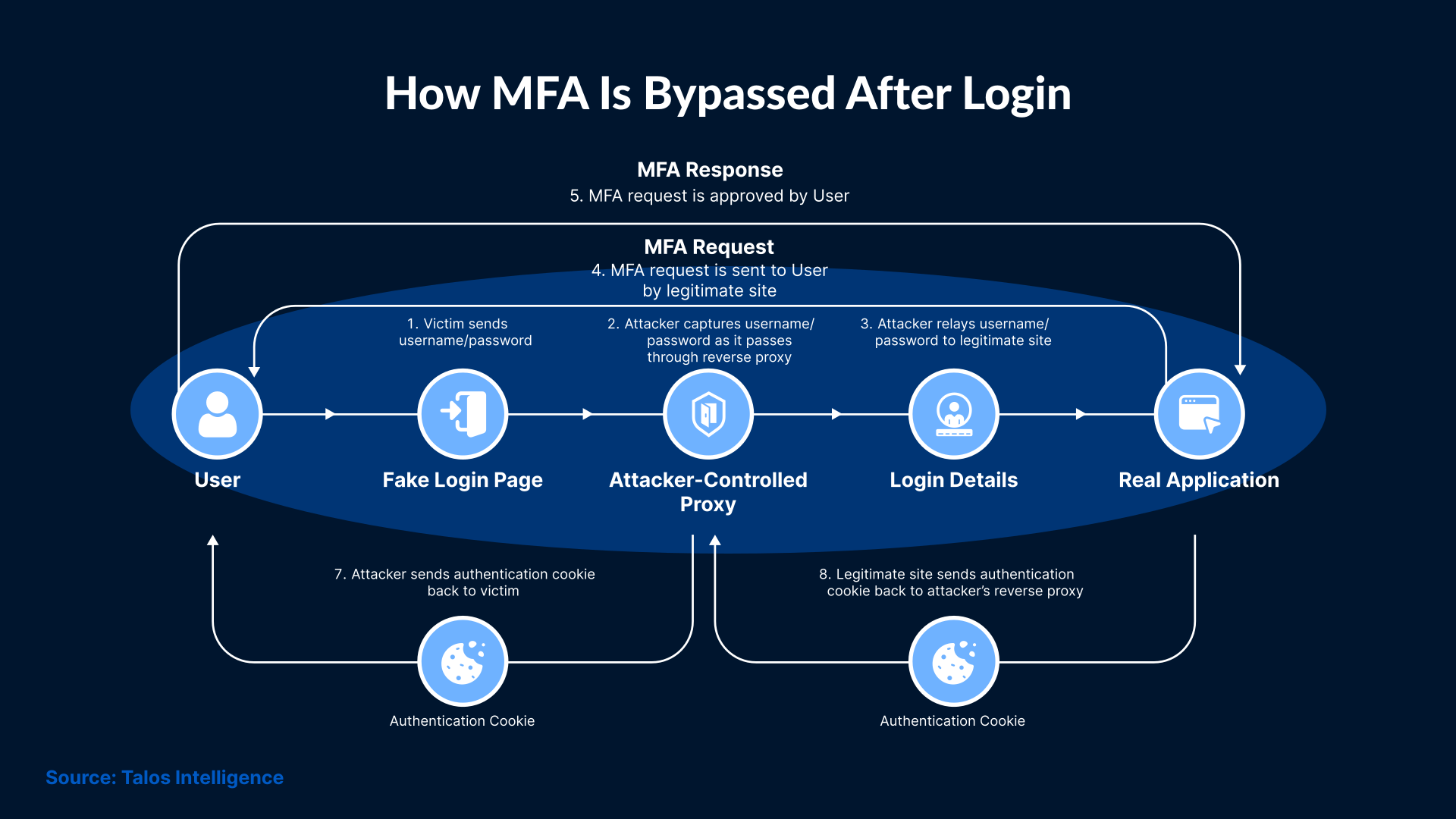
The reason these techniques work is that MFA is checked only at login. Once the identity is approved, systems stop asking questions.
What MFA Does Not Cover After Login
Multi-factor authentication (MFA) is responsible for allowing users to successfully log into their accounts. Once that happens, they assume the session is trusted. This is when attackers start their attack. Here’s what they do to ensure a successful attack:
- Session reuse: They start reusing a valid session cookie or token without triggering MFA again.
- Silent monitoring: They monitor all the activity inside the system to avoid detection. They also read emails before taking any action.
- Making small account changes: They change inbox rules or access permissions in order to stay logged in.
- Operating from different locations or devices: Attackers continue using the account from different locations and devices that users do not normally use. But they ensure that the session remains trusted.
None of this looks like a failed login. To the system, the account still appears to belong to a valid user. Systems authenticate the user at login but do not re-check identity during the session.
Why MFA Alone Does Not Protect Identity
MFA verifies the user at login. It only proves that the login step was completed. Systems authenticate the user at login, but they do not re-check identity during the session. They just assume that the user in control is the same as the user who logged in. In case attackers gain access, MFA won’t be triggered.
This is why issues related to identity verification exist even after having MFA. Identity-related risk continues while the account is being used. Identity should also include monitoring the location and device the system is accessed.
MFA won’t be able to detect any changes made to an account during an active session. It cannot question actions that seem unusual but originate from a trusted login. Attackers use this window to remain active without being noticed.
What Zero Trust Means for Identity
Zero Trust is a security strategy that assumes no identity or device can be trusted by default. Even if a user or device has passed a login check, it must undergo multiple additional checks before it can be verified. Zero Trust relies on ongoing signals during a session.
Here are the things Zero Trust pays attention to:
- Where the account is being used from
- Whether the device looks familiar
- How the account normally behaves
- Whether the activity suddenly changes
Zero Trust is not intended to replace MFA, but rather to further enhance security by not treating access as permanent. It expects trust to change over time.
Observing identity while a user is accessing the system makes it easier for teams to notice unusual activity.
How MFA and Zero Trust Work Differently
Multi-factor authentication (MFA) is used to allow someone to log in to an account. Once the login succeeds, MFA steps aside.
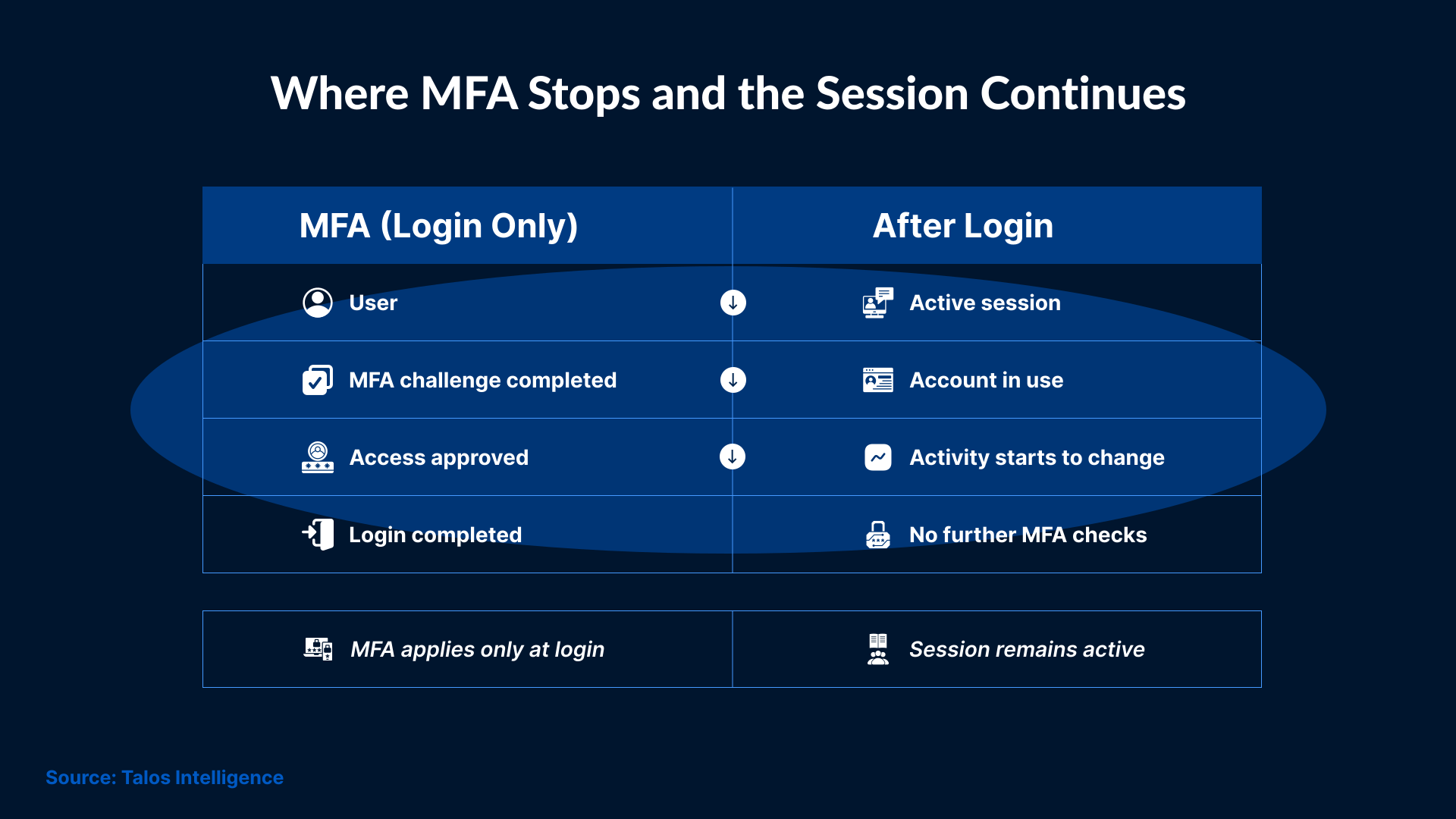
Zero Trust does not stop at login. It keeps paying attention to what happens while the account is being used.
This is why MFA can be bypassed without being broken. It checks access once, while Zero Trust stays in place during the rest of the session.
Where Zero Trust Falls Short
Zero Trust is expected to fix identity problems on its own. But, this strategy only works when proper information is given to it.
It is important to observe identity activity carefully, or else there won’t be anything for Zero Trust to act on. A session may appear trusted even after changes in behavior because the changes will not be visible right away.
Here is when gaps are visible:
- Not monitoring account activity after login
- Missing signals from devices or locations
- Unusual behavior blends in with normal traffic
In such cases, Zero Trust won’t have any significant role to play because it cannot verify trust if there is nothing to measure.
Zero Trust should not be treated as a switch that can be turned on at will. Without proper visibility into the usage of identities, the same assumptions continue to exist that limit the functionality of MFA.
How SOC Teams Can Spot MFA Bypass After Login
The signs of bypassing MFA usually appear after access has already been granted. This means detection depends less on login failures and more on what happens during normal use.
SOC teams will notice issues when:
- An account is active at unusual hours
- Access comes from places the user has never logged in from
- Actions do not match the user’s usual work pattern
- Activity continues even after a password reset
These signals are easy to miss because they do not appear to be a break-in on their own. Each of these actions appears valid, given that the session is already trusted.
This is why MFA bypass is often detected late. Without paying attention to account behavior after login, attackers can remain active for long periods without triggering alerts.
Authentication Threats Seen in Real Attacks
Failed login is not the reason for all identity threats. Many threats appear only after an account is already in use.
Teams will see the following patterns in real incidents:
- Accounts are being used in ways that don’t match normal users.
- Access spreading to other mailboxes or systems gradually.
- Activity that looks normal but happens at odd times.
- Changes that seem normal individually but add up over time.
These threats are harder to spot because they do not happen due to failed authentication. They easily blend in with normal activities.
MFA does not stop this type of activity. It only confirms that access was allowed at one point in time. Teams will need to monitor the behavior of identities, not just how they log in, to detect these threats.
Conclusion
MFA still matters. It works at login, and it does that job well. The problem starts after access is granted. After login, the system continues trusting the session. Activity starts to change, but no one questions it. Attackers keep working quietly.
Zero Trust only helps when it stays active beyond login. It pays attention to how an account is being used while the session is running, not just how access was approved.
Monitoring after login helps catch these changes. SafeAeon helps teams maintain visibility into account activity once access is granted, ensuring changes do not go unnoticed. MFA stays in place. The goal is to cover what it does not see.