

Key Takeaways
- Phishing accounts for around 30% of all the security incidents that happened in 2023. (IBM).
- 51.7% of phishing emails impersonate one of the top 20 global brands, with Microsoft leading the list. (Cloudflare)
Introduction
Even though cybersecurity is constantly evolving, phishing attacks are still getting worse. These attacks try to trick people into sharing sensitive data. This can include passwords, payment details, or internal company information. As technology has improved, phishing schemes are more convincing in 2024. Attackers are targeting both individuals and organizations.
According to new studies, phishing emails remain one of the most common entry points for attacks. According to the Cybersecurity & Infrastructure Security Agency (CISA ), around 90% of cyberattacks start with a phishing email. This is why strong defenses matter. Understanding the risks can help mitigate phishing attacks and develop more effective strategies to counter them.
How to Spot a Phishing Attack?
Because of advances in generative AI, it is harder to spot phishing attacks. Cybercriminals now use sophisticated tools to make messages that are very believable. This makes it harder to distinguish real from fake messages. It is important to stay cautious and understand common phishing tactics to reduce the likelihood of falling for an attack. Even though these improvements have been made, looking for common warning signs is still a good way to stay safe and teach others about scams.
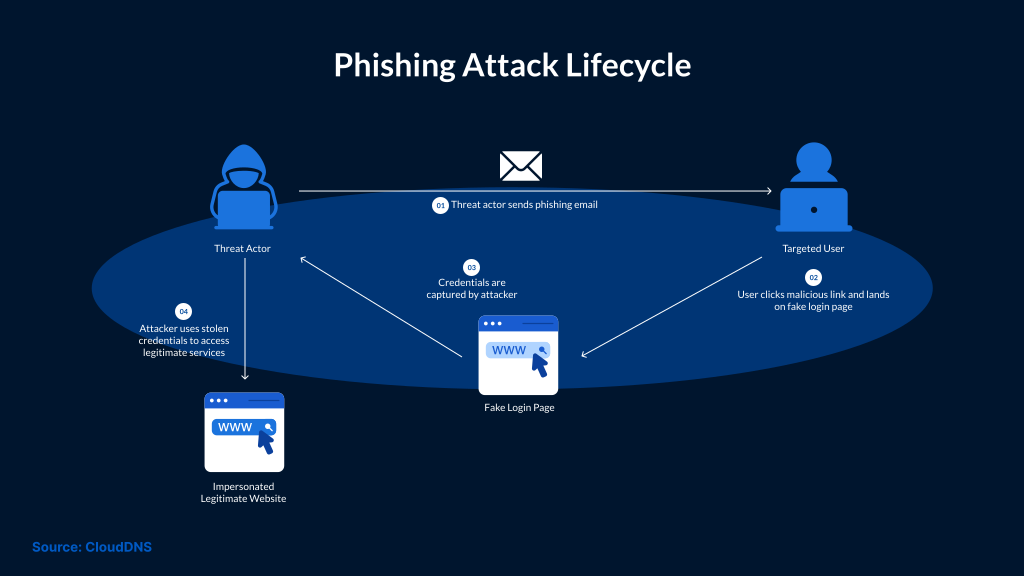
Watch for these warning signs in sender addresses and messages:
- Pay close attention to sender addresses that have been slightly changed. With only a few small changes, attackers often use fake company names to trick people. Using "[email protected]" instead of "[email protected]" is a common way for scammers to get your information.
- Phishing emails often start with a generic welcome like "Dear Customer" instead of your name. Legitimate businesses tailor their messages by speaking directly to you.
- Spelling and grammar mistakes can be a warning sign of a scam. Reputable businesses ensure their emails look professional and are free of mistakes. Strange words or blanks like "[enter the name]" are another sign of a source you can't trust.
- Check for urgent or threatening language in the emails. Phishing emails often make people feel scared. If someone sends you a message saying your account will be deleted if you don't reply right away, you should be very careful.
- Emails that ask for sensitive information can be a big red flag. Reputable organizations typically do not ask for passwords or full payment details by email. If you receive such emails, mark them as spam and report the email address.
Suspicious links and unexpected attachments:
- Before clicking a link, hover over it to see where it takes you. Be careful with files you didn't ask for, as they may contain malware.
- Links or domains that do not match the organization: Links that don't match the official website of the company are a strong sign of phishing. Check all links before clicking on them.
- Unusual requests from people you know: Phishing scams often use email accounts that have been hacked. If someone you know sends you a strange request, make sure it's really them by using a different method.
- People and businesses can lower their risk of phishing attacks and keep their digital environment safe by learning these warning signs and spreading information about cybersecurity threats.
Strategies to Stop Phishing Attacks
To build a strong protection program, you need to understand phishing risks and how to reduce them. Implementing email filtering systems, multi-factor authentication, and teaching workers how to spot phishing red flags are all proactive ways to stop phishing attacks. Organizations must also raise awareness of cybersecurity issues, such as phishing, through regular training and simulations. This gives workers the tools they need to avoid common threats.
New technologies, such as AI-generated emails and deepfake videos, have also been used in phishing attacks, making them harder to spot. Cybercriminals are targeting certain businesses, such as retail, healthcare, and finance, to exploit their vulnerabilities. Phishing is evolving constantly, so companies need to use new tools and strategies to stay ahead of attackers.
Investing in phishing education and prevention is no longer a choice; it's a strategic requirement. Organizations can protect sensitive information, maintain stakeholders' trust, and ensure operations run smoothly by prioritizing mitigation steps. The safest companies in 2024 will be those that actively plan for and adapt to hackers' ever-changing strategies. As a result, they will make stopping phishing a central part of their cybersecurity strategy.
How to Prevent Phishing Attacks in Your Organization
Phishing attacks are among the most common and dangerous forms of cybercrime. They try to steal private information or money from businesses. To reduce these risks, you need robust phishing prevention measures. When you combine training, technical controls, and vigilance, you get a comprehensive plan to reduce risks and stop phishing attacks.
Best Practices for Stopping Phishing
To make sure that your Windows Firewall settings are always correct and up to date, follow these tips:
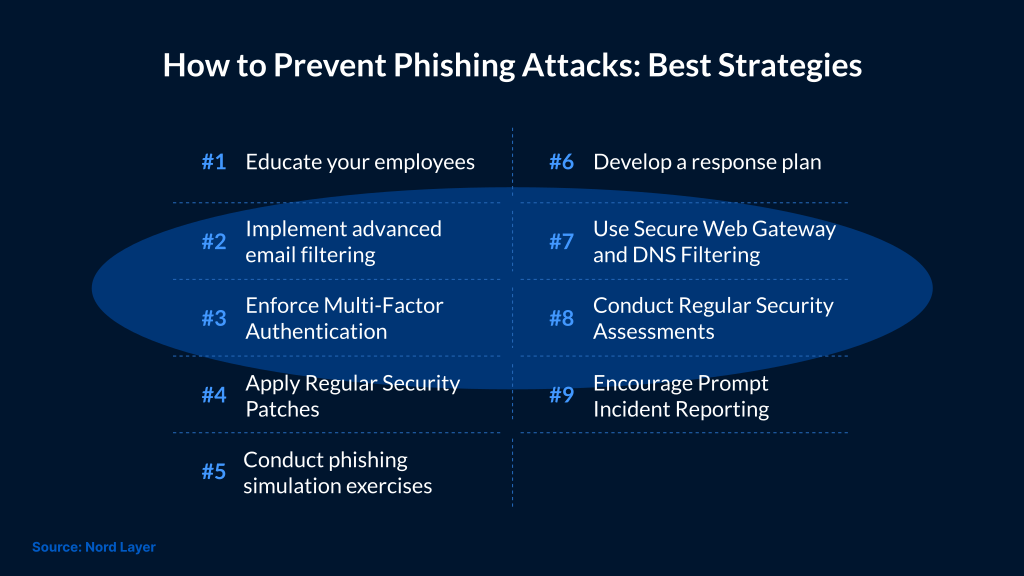
1. Teach your workers
To raise awareness of phishing, it's important to educate employees about the tricks attackers use. Run regular training sessions so that they can spot misspelled words in emails, avoid suspicious links, and report any strange emails. Make people aware of Business Email Compromise (BEC) scams, such as fake CEOs requesting urgent money transfers. When employees receive such requests, they should always double-check them by calling or using another channel to contact the person.
2. Set up advanced email filtering
One of the best ways to stop phishing emails is to use advanced email filtering. These tools scan for malicious links, attachments, and impersonation patterns. For example, Google's Gmail security stops more than 99.9% of phishing attempts every day, blocking billions of harmful emails. Keep these tools updated so protections stay current, directly addressing the risks posed by phishing attacks and their mitigation.
3. Make Multi-Factor Authentication (MFA) mandatory
MFA adds an extra layer of security by requiring verification methods beyond passwords, such as fingerprints or one-time codes. MFA reduces unauthorized access if passwords are stolen, but it does not stop all attacks. Security keys can significantly reduce phishing-based account takeover.
4. Keep systems up to date and patch vulnerabilities
Phishing often leads to malware or credential theft. Patching can be done to reduce the impact of follow-on exploitation.
5. Run phishing simulations
Phishing scenarios test employees' awareness and preparedness. Organizations can test and improve their response to phishing incidents through simulated activities such as tabletop drills or red-team exercises.
6. Make a plan for what to do next
When phishing attempts are found, you can move quickly if you have a clear response plan. Outline the steps for reporting an event and containing the incident. Regular drills ensure the plan remains useful as threats change.
7. Use DNS filtering and safe web gateways
Secure web gateways and DNS filtering prevent people from accessing known harmful websites. These tools monitor internet traffic to reduce access to known malicious sites and risky categories.
8. Make it a habit to report
Tell your workers that they won't be blamed for reporting phishing attempts. Make it easier to report things by setting up a specific email address or a button that is easy to click. Praising workers for reporting phishing helps create a culture of proactivity in security.
Organizations can reduce the risk of phishing attacks and keep important data safe by prioritizing phishing prevention strategies and raising cybersecurity awareness about phishing.
Conclusion
As of 2024, phishing remains one of the biggest cybersecurity threats. These attacks exploit mistakes people make and clever tricks to access private data. Businesses need to understand the risks and ways to prevent phishing attacks to protect themselves from these new threats. Using strong methods to stop phishing attacks is important for lowering risk. Protecting private data also means raising awareness of phishing and other forms of cybercrime.
Companies should focus on preventive measures, such as employee training and the use of advanced tools to detect threats. SafeAeon can help strengthen phishing defenses with monitoring, detection, and response support. Make sure cyber threats don't reach your business. Reducing phishing risk requires continuous training, layered controls, and fast incident response.