

Key Takeaways
- Google in-house AI spam filters block over 99.9% of phishing attempts.
- Attackers are using AI to impersonate Google support staff via phone calls and emails to trick users into giving their Gmail recovery codes.
- Google is implementing stricter email authentication measures (like DMARC, DKIM, and SPF) for bulk email senders. This makes it hard for spammers and phishers to spoof legitimate domains.
Introduction
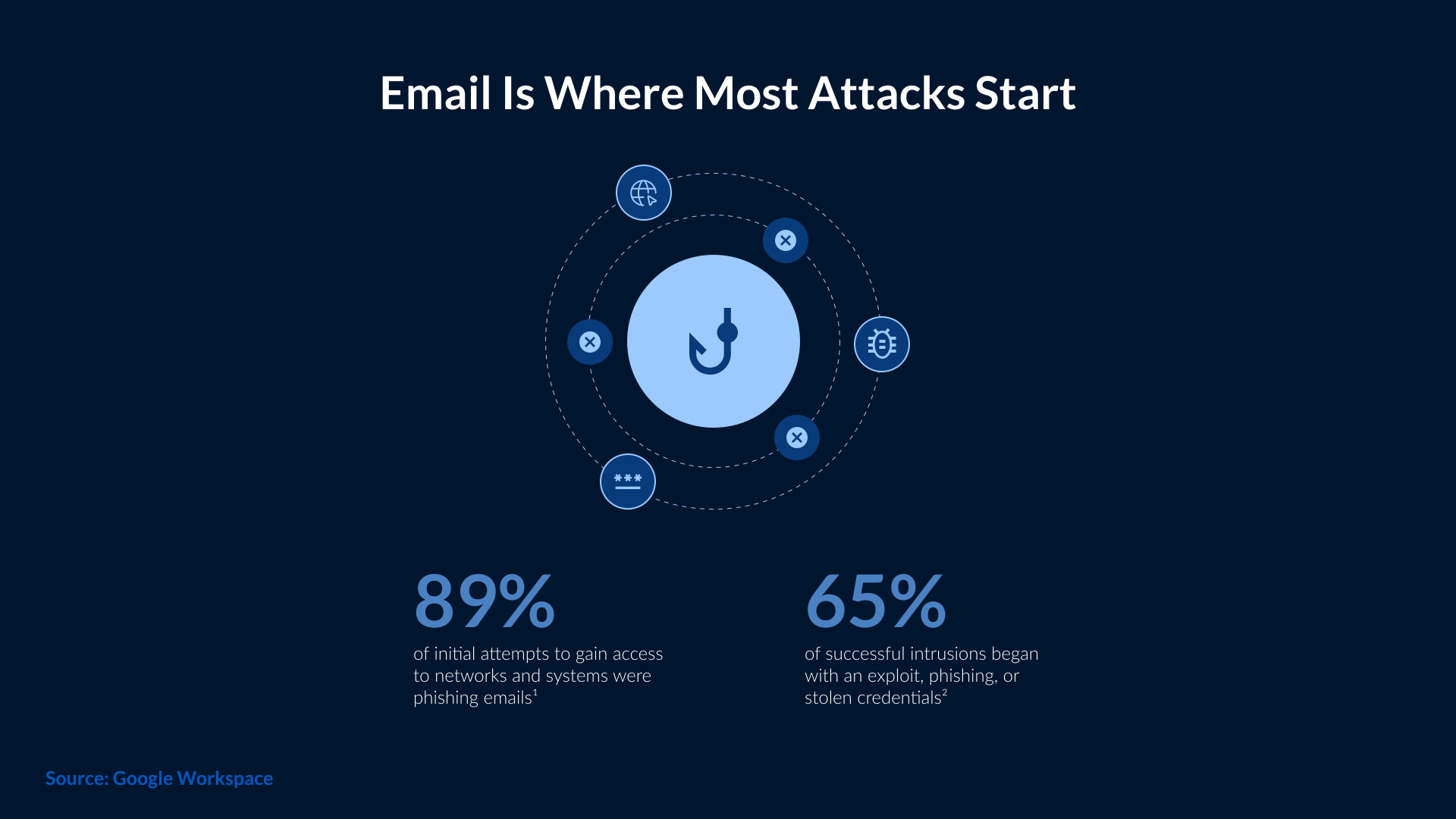
Gmail has always been a common target for cybercriminals, and with the arrival of advanced AI tools, the threat level has increased significantly. Now, attackers no longer rely on generic phishing emails or scam methods. They are using AI to create convincing messages and imitate real support agents to make attacks look more genuine. This change in attack patterns has made Gmail users more vulnerable because they can’t differentiate between real and fake messages.
Another reason why Gmail is the prime target of attackers is its large user base. A single compromised account can expose personal data, financial details, connected apps, and cloud files. AI now automates large parts of the attack process, allowing criminals to reach more victims at a faster rate. AI-driven attacks use a combination of large-scale reach and realistic deception, which is why they continue to succeed. Let’s get into the details of how hackers use AI to target Gmail users and steps to prevent those AI-based attacks.
How Hackers Are Using AI to Target Gmail Users
Hackers use artificial intelligence to break into Gmail accounts on a global scale A new cyberattack technique is alarming digital security experts. Cybercriminals are using artificial intelligence to create fake calls and highly personalized emails, tricking Gmail users and stealing their credentials. The sophistication of these scams has led authorities to issue global warnings about this new threat.
How do these hackers operate?
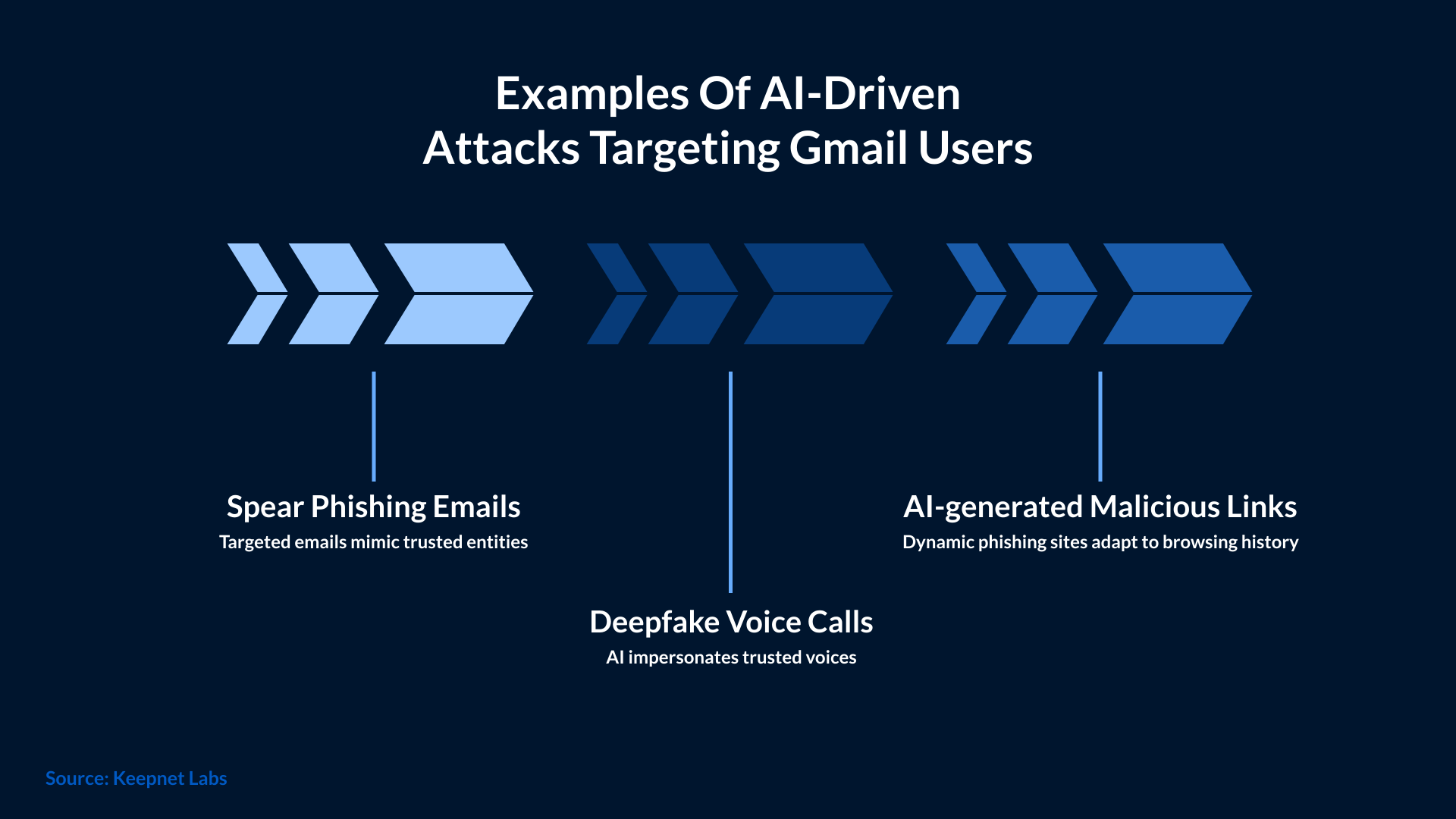
The attack usually begins with a phone call that appears to come from Google support. The scam is particularly effective because of the use of generative AI, which can mimic human voices and accents in a highly believable way.
During the conversation, the victim is informed that there is suspicious conduct on their Gmail account. The scammer claims that to ‘fix’ the issue, the user must follow a security procedure. Shortly after, the victim receives an email containing a malicious link.
As they click on the link, the user is redirected to a fake Google website that requests their credentials. Completely unaware of the situation, they are now providing their personal information to cybercriminals who can now access their emails, personal information, and other linked accounts.
The criminal network behind these attacks
It is unclear where this hacking network originates or who is responsible, but cybersecurity researchers are noting that the attacks are spreading through several countries.
This technique is dangerous because it combines scale with highly convincing impersonation. The combination of fake calls and highly personalized phishing is allowing these cybercriminals to compromise accounts of thousands of users around the world.
Given the seriousness of the situation, international authorities, including the FBI, have issued warnings about the network's ability to obtain sensitive information with methods that are difficult to detect.
The Tricks Cybercriminals Use to Slip Past Gmail’s Defenses
Cybercriminals are using advanced tools to bypass Gmail’s built-in protection. In the past, attacks were easier to spot due to spelling errors or unusual layouts. But things have changed, and Gmail security AI-driven attacks look a lot more polished and believable. Attackers rewrite emails in different styles, ensuring a proper tone and fewer mistakes. This makes it difficult for filters to classify the message as suspicious.
Criminals can create multiple variations of the same message, with each slightly different from the previous version. This type of phishing is called polymorphic phishing. It confuses Gmail’s spam systems, which is why AI-driven attacks on Gmail have increased lately.
Attackers are using lookalike domains resembling official Google URLs. They make small and unrecognizable changes in the domains that lead users to add their credentials to fake sign-in pages. These fake pages are created in such large volumes that it takes time for Google to block each one of them. Moreover, new pages appear just as quickly, making things difficult for even the tech giant.
Some attackers are using a different tactic, which involves combining email scams with AI-driven voice calls. The victim receives a fake Gmail alert, followed by a call from a fake support agent. The use of deepfake voice tools makes those calls convincing. It doesn’t take long for victims to drop their guard and expose their sensitive information.
AI has also made it easier to send phishing messages in bulk. Criminals now use automated botnets to send dozens of emails at a time. Even if some messages are blocked, they know that enough messages will still reach inboxes to cause damage.
All these methods are used for a single purpose, i.e., bypass Gmail’s detection systems. Attackers no longer rely on luck, but they are extensively using AI to create and refine their attacks to make it harder for users to detect and block them.
Recent Examples That Show How Serious the Problem Is
Many security agencies and research teams have confirmed a rise in Gmail security AI-driven attacks. The evidence is public as well. In May 2025, the FBI’s Internet Crime Complaint Center reported that criminals are using AI-generated voice calls and scripted messages to guide victims toward fake Google login pages. They also found that the calls made by the attackers often sound like real support representatives, which increases the success rate of credential theft. In another advisory published by the FBI in December 2024, it was found that phishing emails written by AI are increasing. These emails mimic official Gmail alerts. According to the FBI, these messages are in a proper format and contain clean language, making them less likely for users to doubt. Even Google’s own Threat Analysis Group has confirmed attempts by attackers to use generative AI to produce phishing templates, fake security notifications, and Google-lookalike pages. TAG noted that these AI-assisted kits create multiple variations of the same scam, reducing the likelihood of Gmail’s filters blocking them.
In May 2025, the FBI’s Internet Crime Complaint Center reported that criminals are using AI-generated voice calls and scripted messages to guide victims toward fake Google login pages. They also found that the calls made by the attackers often sound like real support representatives, which increases the success rate of credential theft.
In another advisory published by the FBI in December 2024, it was found that phishing emails written by AI are increasing. These emails mimic official Gmail alerts. According to the FBI, these messages are in a proper format and contain clean language, making them less likely for users to doubt.
Even Google’s own Threat Analysis Group has confirmed attempts by attackers to use generative AI to produce phishing templates, fake security notifications, and Google-lookalike pages. TAG noted that these AI-assisted kits create multiple variations of the same scam, reducing the likelihood of Gmail’s filters blocking them.
All these reports clearly show the extensive use of AI by attackers to refine their scams and accurately imitate Google’s ecosystem. This is why Gmail security AI-driven attacks are being treated as a growing concern by law enforcement agencies and major tech companies.
What Google Already Does to Protect Gmail Users
Google is heavily investing in tools that ensure the protection of users and their data. Gmail uses multiple layers of security designed to detect unusual behavior and block harmful messages. The main goal is to stop attackers from reaching someone’s inbox.
AI-Driven Spam & Phishing Detection: This is one of the strongest protections offered in Gmail. It identifies billions of messages every day to search for patterns linked to scams or malware. The suspicious email is automatically flagged or moved out of the inbox.
Safe Browsing Warnings: Both Google Chrome and Gmail use safe browsing warnings. In this, if a user tries to open a dangerous link, especially one leading to a fake login page, a warning screen pops up on the screen and blocks the site until the user confirms whether they wish to proceed.
Automatic Malware Scanning: These are used to scan the attachments for harmful scripts or known malicious signatures. This helps prevent common attacks that deliver malware through email.
Alerts for Suspicious Login Attempts: Gmail protects accounts by sending alerts for suspicious login attempts. This can include access from new locations or unfamiliar devices. Users will receive a prompt to verify the activity, and until it is verified, the login remains blocked.
Device & Recovery Email Alerts: Google also sends these alerts whenever there is a change in account settings. This helps users catch unauthorized activity quickly.
Third-party OAuth App Access: Google also monitors third-party OAuth app access for advanced protection. If an app requests sensitive permissions or shows risky behavior, Gmail immediately warns the user or blocks the request entirely.
These protections don’t stop every threat, especially when attackers use AI to refine their techniques, yet these protections can help reduce the number of scams that reach users in the first place.
How Attackers Still Manage to Bypass Google’s Security
Gmail has certain safety features that try to block most harmful emails, but some threats still manage to slip through. Criminals are frequently setting up new phishing pages that look just like the Google sign-in page. These pages appear and disappear quickly, which makes it hard for Google to identify them. Since AI generates these pages in minutes, attackers can run a continuous cycle through phishing pages.
AI-written emails also create problems for detection systems. Often, they don’t match the patterns spam filters rely on. Moreover, the text also looks clean, natural, and personalized. This makes it harder for Gmail to determine whether a message is fake or legitimate.
Many advanced groups are using real-time MFA phishing kits and reverse-proxy tools that can capture login codes as soon as the user enters them. Then, the session is forwarded to the attacker, giving them access even when the account is protected by two-factor authentication.
Some attackers are moving to voice-based scams specifically to avoid the email filter altogether. They place a call to victims using an AI-generated voice to impersonate Google support. Since these attacks begin outside of the inbox, they cannot be screened by Gmail’s usual detection or blocking layers.
Social engineering is also a major weakness. Here, attackers rely on the victim’s urgency, confusion, or fear to act quickly. Even people with strong technical controls become victims and hand over access to their accounts to criminals.
Attackers also exploit OAuth token theft. Instead of stealing passwords, they trick users into granting access to a malicious third-party app. Upon getting the approval, the attackers can read emails, send messages, and access the account without needing the password.
These methods show why attackers continue to find loopholes in Gmail’s security. Most of these methods rely on AI-generated legitimacy along with social pressure to bypass defenses without directly attacking them.
The Risks for Businesses Using Gmail and Google Workspace
AI-driven threats are not only impacting individual Gmail users, but businesses, too. A single business account takeover can expose files stored in Drive, internal discussions in Docs, and upcoming meeting schedules in Calendar. Getting this level of access can be dangerous for corporate Gmail accounts.
Gmail and Google Workspace are also used for data exfiltration. When the information is sent out from a trusted platform like Gmail, it rarely triggers any alerts. Some groups use malicious OAuth apps that trick employees into granting permissions to email accounts for sending emails without needing the password.
Businesses also face AI-powered BEC attacks, where criminals use AI to mimic writing styles or impersonate suppliers. Then they make fraudulent payment requests or unauthorized data transfers. Another growing issue is supply-chain impersonation, where attackers pose as partners or vendors to gain access to shared documents.
Attackers just need access to one Workspace account, and then they can move laterally. They will search everything, from shared drives to team folders, and even use a compromised account to target other employees. This chain reaction makes Workspace environments even more vulnerable when attackers rely on automation and AI.
Simple Steps Every Gmail User Should Take
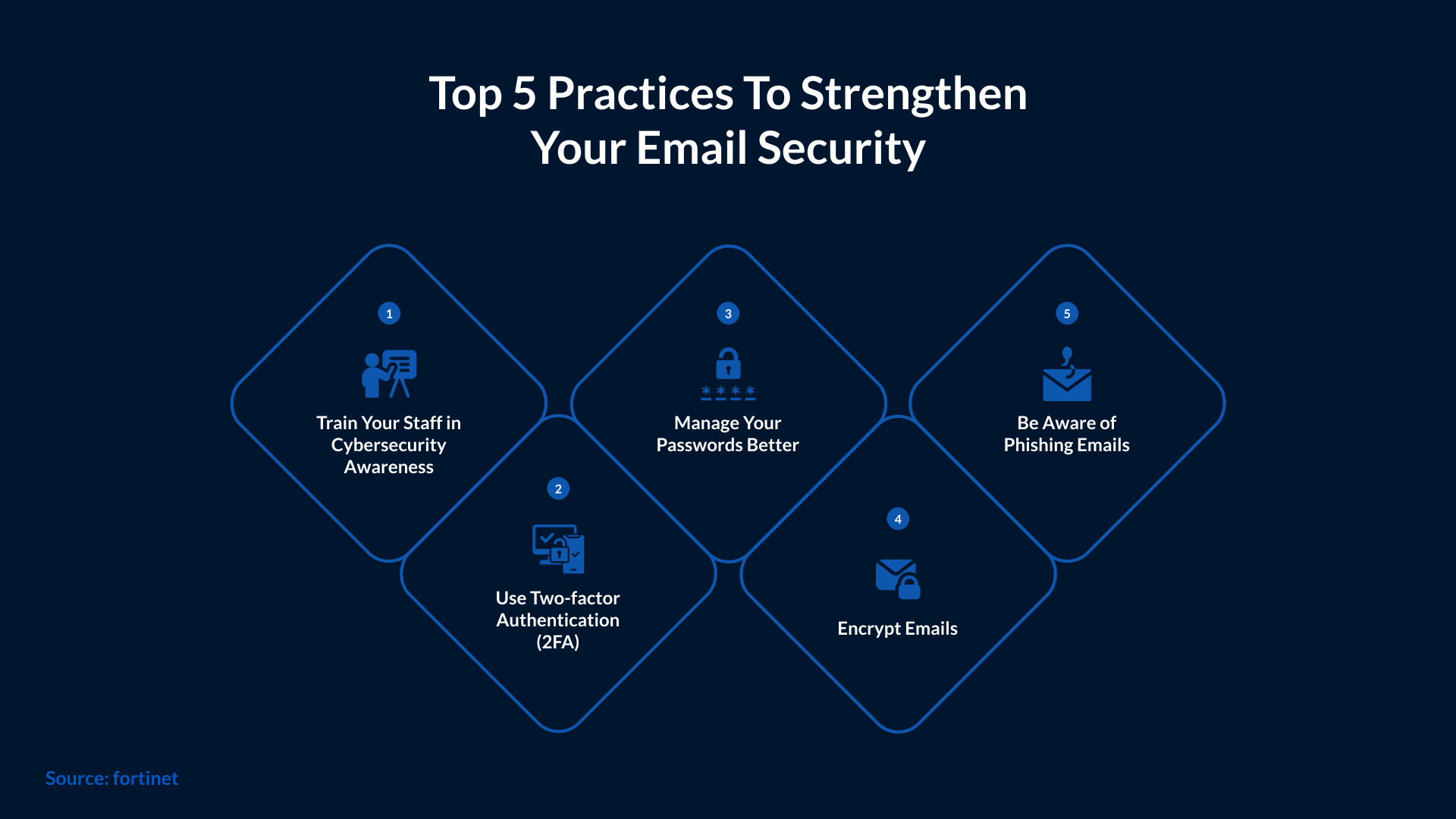
To avoid becoming a target of this type of attack, you need to follow strong digital security practices. Here are some measures you may want to implement:
- Don't trust suspicious calls
- Carefully review emails before clicking anything
- Don’t add your credentials to unknown links
- Turn on two-step verification (2FA)
- Keep software and antivirus up to date
- Check the “Last account activity” panel at the bottom of Gmail to spot unknown logins.
- Review and remove third-party apps that have access to your Google account.
What Companies Can Do to Reduce the Risk
Organizations using new Gmail.com and Google Workspace need stronger controls to counter modern threats. They can begin by monitoring their account activity through SIEM or XDR. This will help detect unusual logins, suspicious locations, or unauthorized OAuth approvals.
Companies should also enable DLP controls, which help monitor and block sensitive information. Restricting unknown OAuth apps will keep attackers away from using malicious integrations to read or send emails from employee accounts.
Implementing device compliance policies is also crucial, as it ensures that only secure and up-to-date systems can access corporate Gmail. Companies must organize awareness programs for their employees to help them recognize fake alerts, malicious links, and AI-generated communication. Every account must have multi-factor authentication, especially those with administrative access.
These steps will help reduce the exposure created by automated attacks and limit the damage if an account is compromised.
Conclusion
AI has certainly made it easier for attackers to create convincing scams. Gmail users are feeling that shift more than ever. Google is trying its best to strengthen security systems, but criminals are using new tools to copy Google’s design and pressure users through voice and email. AI-driven attacks are now harder to detect and faster to execute.
Even now, awareness is the best defense against these attacks. People must know how these scams work so as not to fall victim to them. Businesses also need to have more monitoring and controls around Gmail and Workspace accounts to prevent a small incident from turning into a major breach. SafeAeon has tools to manage 24/7 monitoring and threat detection, which is essential from a Gmail security perspective against all kinds of threats.