

Key Takeaways
- About 88% of breaches in web application attacks involved the use of stolen credentials. (Verizon DBIR)
- Around 2 billion unique leaked credentials are circulating on the dark web. (Deepstrike)
Introduction
Passwords are still used almost everywhere. People reuse and share their passwords without knowing the risks. Attackers take advantage of these situations. Phishing emails and malware are enough to steal a password, and this is how many security incidents start.
The problem can be reduced using passwordless authentication. When passwords are removed from the login process, attackers would find it difficult to attack that device or account. Phishing attempts can be reduced, and stolen credentials will not be as damaging as they are right now.
Passwordless authentication can reduce many risks. Many password attacks become less effective, while device trust and identity systems become more important. However, some risks still remain.
In this blog, the discussion is around where passwordless authentication helps and where it falls short. This can help teams decide whether it fits their environment rather than assuming it will solve every problem.
What is Passwordless Authentication
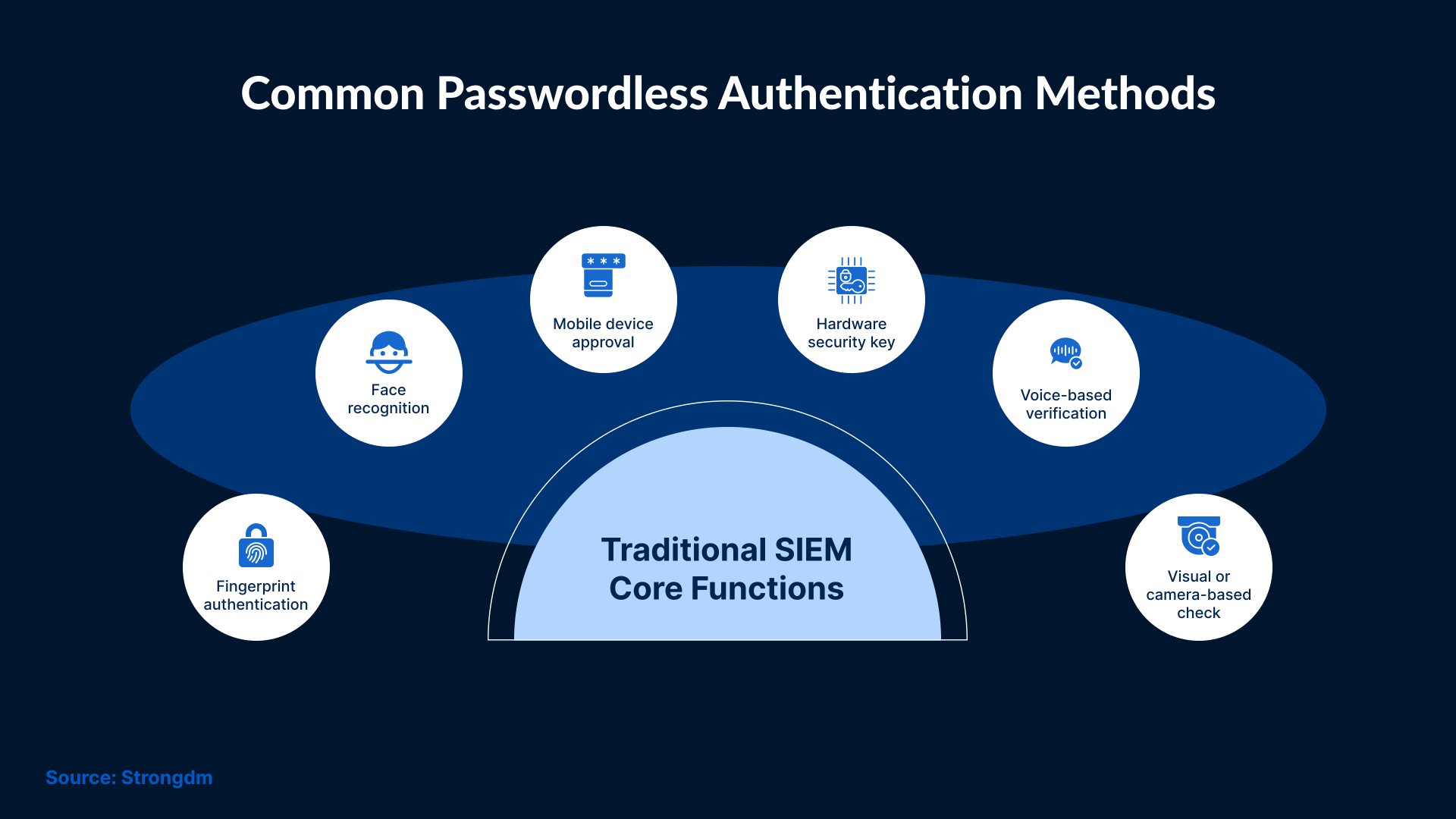
Passwordless authentication is a way of signing in without entering a password. The system or website will grant you access using something you have or something you are. There is no need to prove who you are with something you remember.
The password is removed from the login flow. There is no shared secret that anyone can guess or reuse. Passwordless authentication is commonly used in the following ways:
- A trusted device that approves the login
- A fingerprint or face scan that is used to unlock access
- A secure key stored on a device or physical token
In each case, the system will verify the user’s identity without requiring a password. Verification continues in the background, mostly through public-key cryptography. The private key never leaves the device. At the same time, nothing reusable is sent over the network.
There is a lot of confusion around passwordless authentication. It's important to understand what passwordless authentication is not.
What it does not mean:
- Removing identity verification
- Removing access controls
- Removing the need for recovery processes
Passwords are replaced, but authentication still happens. It’s still important to manage identities and monitor access.
Since passwords are no longer used, many common attacks no longer work. Moreover, security now depends more on the devices used and on how the identity system handles authentication. Proper management of these aspects will make a big difference to the overall outcome.
How Passwordless Authentication Works
When a user tries to sign in, no password is requested. Their identity is verified using a method already registered with the user.
In most cases, the system sends a challenge to a trusted device or key. The device proves ownership by responding to that challenge. If the response is valid, the user will be granted access.
Verification occurs using cryptographic keys stored on the device. Private keys stay within the device. Only a signed response is shared, which an attacker cannot reuse.
This is one example of how passwordless authentication works using device-bound cryptographic keys.
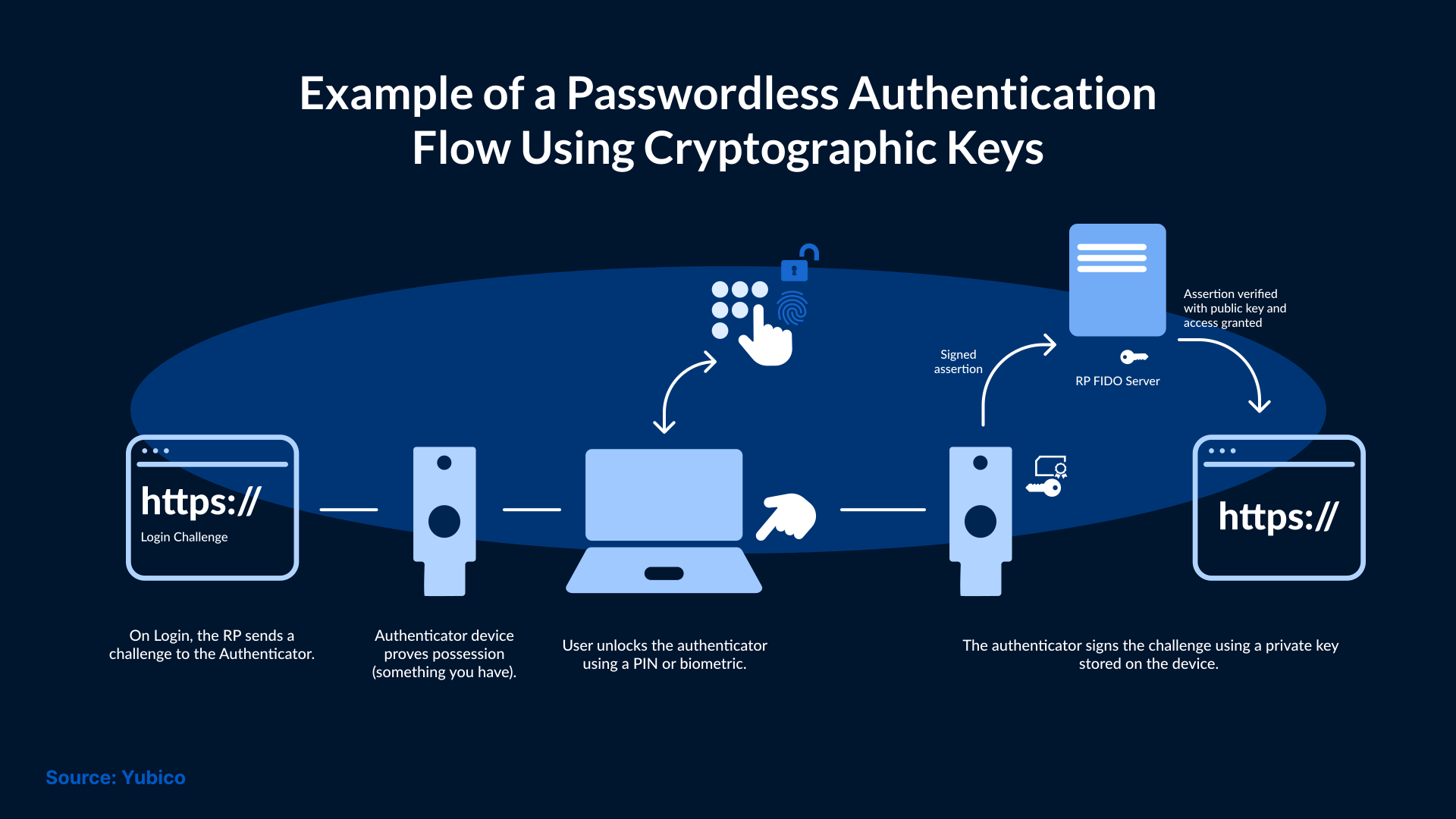
Biometrics may still be used, but only to unlock the device or key. The biometric itself is not stored or sent by the device.
Identity systems validate the response. Once that happens, they apply access rules before creating a session. If there is a misconfiguration in the systems, the security benefits of passwordless authentication are reduced.
Where Passwordless Authentication Improves Security
Passwordless authentication is highly effective against many common attacks. Phishing attacks can be significantly reduced because there are no passwords for attackers to steal. Even if a user clicks a malicious link, there is nothing useful for an attacker to collect in many cases.
Stolen password lists also become less valuable because attackers cannot reuse old credentials on other systems. Brute-force attempts also become ineffective because there is nothing to guess.
Another improvement happens in how logins are approved. In passwordless authentication, access usually requires a device that has already been registered. If an attacker does not have access to that device, logging in becomes difficult. This adds a security layer that passwords alone have never provided.
Passwordless authentication also reduces the risk caused by user behavior. Users no longer need to create strong passwords or manage them. This removes a common source of errors.
With these improvements, many environments have been able to lower the number of successful attacks. Some risks remain even with passwordless authentication.
Where Passwordless Authentication Falls Short
Passwordless authentication removes the password, but attackers can still misuse it. Here are the risks that passwordless authentication cannot fully remove:
Device Trust: If a device is lost or stolen, access can sometimes be approved before the user notices the problem. In some environments, sessions can remain active for extended periods if session controls are weak. This gives attackers ample time to act without needing to sign in again.
Account Recovery: When a user loses a device or is unable to complete a biometric check, access still needs to be restored. But the recovery steps are often simpler than the standard login process. Abusing those steps can allow attackers to take over the account.
Dependency on Identity Providers: Passwordless systems rely on identity providers. So, if the identity service is compromised or not configured properly, attackers can get access to the systems. Removing passwords cannot protect the systems if access is set up carelessly. If too many systems trust each other automatically, then attackers can move around without needing a password at all.
User Approval: At times, this step becomes the weak point. If users approve login requests without review, the wrong person can be granted access to the system. This rarely happens, but when it does, it leaves a serious impact on the environment.
Lack of Strong Identity Controls: Passwordless authentication can block many older attacks, but it does not remove the need for strong identity controls. Security issues can arise when devices and identity systems are not properly managed.
Passwordless Authentication vs Other MFA Options
The main difference between the two is that one removes passwords, while the other adds checks on top of them.
Authentication is often explained using these three factors, but not all possession-based methods offer the same level of security.
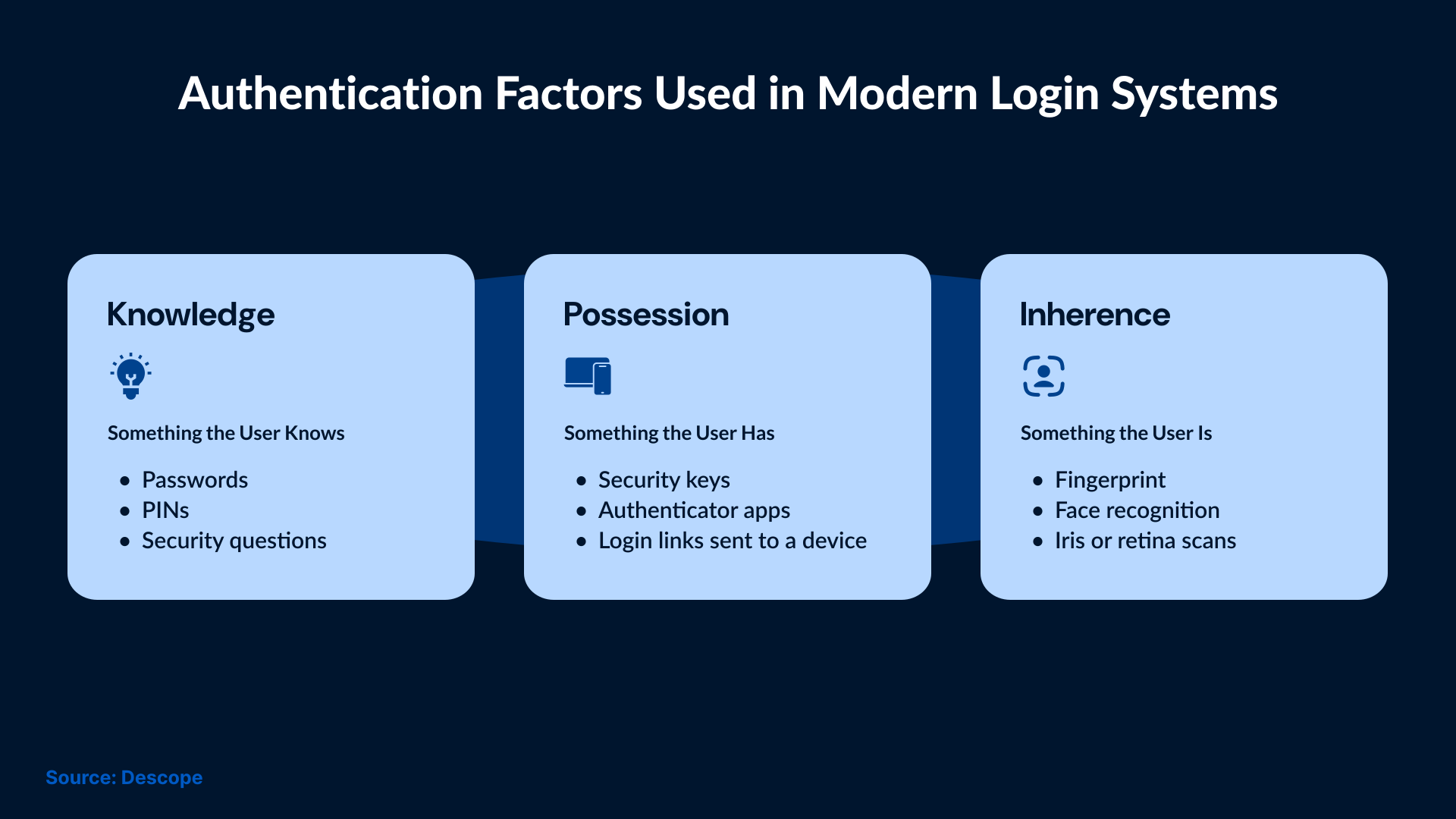
How traditional MFA works
Traditional MFA adds another step to the password. That step could be a one-time code or a push notification. This improves security, but the password remains part of the process. In case the attacker steals the password, then they need to bypass one more control.
How Passwordless Authentication is different?
Passwordless authentication takes a different path. There is no password to begin with. Access depends on a device or a key that proves ownership. This method can mitigate many password-based attacks, but it also places greater responsibility on the device and the identity system.
Some MFA options, such as hardware security keys and app-based cryptographic challenges, help protect against phishing. They provide the same level of protection as passwordless methods. Organizations can add layers to MFA, but in passwordless setups, they will have to replace the entire login setup.
Flexibility in Real Environments
In some environments, MFA offers more flexibility than passwordless authentication. It is possible to add MFA gradually and adjust their risk levels as required. Users can also apply MFA to sensitive actions. But passwordless authentication usually requires a broader change to how users sign in and recover access.
Using Passwordless and MFA Together
It is not about choosing between passwordless and MFA. In many cases, teams use both. Passwordless methods handle logins, whereas MFA is used for high-risk access. It is important to understand what each option is good at and where its limits are.
IAM Challenges in Passwordless Environments
Passwordless authentication changes the way users sign in, but it does not reduce the need to manage access. In many cases, it makes that even more important.
Users can now sign in using devices or keys. Those devices are added when someone joins and updated when their role changes. In case a user decides to leave, then that particular device can be removed. These actions need to be taken on time to ensure that old access does not stay active for too long.
Account recovery is another weak spot. When a device stops working or gets stolen, users still need a way to regain access. The steps for recovery are often simpler than the standard login process. If they are not handled carefully, then attackers can exploit recovery steps.
Passwordless login does not have any control over user activity after they sign in. If a certain user has wide access, then removing the password will not stop misuse. It’s important for teams to review permissions.
Teams also need visibility, meaning they should know which devices are trusted, which are still active, and which users have access. Without that clarity, they can easily miss real problems.
The efficiency of passwordless authentication increases when access management is already under control. If identity processes are weak, security will not improve after removing passwords. It will just shift the risk.
When Passwordless Authentication Is Not the Right Choice
Not every environment is suitable for implementing passwordless authentication. It can cause problems in places where devices are shared. If multiple people use the same system or workstation, then it becomes unclear who is actually signing in.
Passwordless authentication can be risky for high-privilege access. For admin accounts and sensitive systems, extra confirmation is required before making any changes. Using a single passwordless login may not be enough in these situations.
Compliance can be another challenge. Some rules require clear login steps and recovery processes. If passwordless login and recovery are not clearly documented, audits can become difficult to pass.
Passwordless authentication also struggles in environments where identity management is already weak. In such environments, devices are not properly tracked, and there is no formal recovery process. Users sometimes skip access reviews. These problems cannot be fixed by removing passwords.
In these cases, passwordless authentication can further complicate the process without improving security.
How to Decide If Passwordless Authentication Fits Your Security Model
This decision should not start with the technology. It should start with how access is handled in your organization.
If devices are tracked properly and access is reviewed regularly, passwordless authentication can work well. Recovery steps also need to be clearly defined for passwordless authentication to work. In these environments, removing passwords reduces noise and blocks common attacks.
If access rules are loose and rarely reviewed, passwordless login will not fix that. It may hide problems because sign-ins proceed smoothly, while the underlying access remains unchecked.
It is better to look at areas where extra control is needed. Admin access and sensitive actions should not be left passwordless. In such areas, additional checks need to be active. Mixing approaches usually works better than replacing everything at once.
The right choice depends on the level of maturity of identity management. Passwordless authentication works best as part of a broader access strategy, not as a quick replacement for passwords.
Conclusion
Passwordless authentication removes a long-standing weakness, but it should not be used as a replacement for strong access controls. It certainly makes some attacks harder by shifting attention to devices and identity systems. But these areas need to be managed properly in order to reduce risk using passwordless login. Without proper management, it can create blind spots.
But the real question is not whether passwords should disappear, but whether identity is being handled carefully after login. Strong decisions come from a clear understanding of where passwordless helps and where it does not.
This is the approach taken at SafeAeon. Passwordless authentication is part of a broader identity and access strategy, not a standalone fix. Security remains focused on keeping access visible and controlled, even as the login methods change.