

Key Takeaways
- Software vulnerabilities now account for 31% of breaches, surpassing stolen passwords. This shows why unpatched systems have become a major target for attackers. (Verizon DBIR)
- Nearly 67% of exploited CVEs are classified as zero-days at the time of the attack. This shows how quickly attackers can act before many teams have a patch available. (Cisco Talos)
Introduction
In today's digital world, where everything is connected, software vulnerabilities are a constant threat to businesses of all kinds. Malicious actors can exploit unpatched software vulnerabilities to steal sensitive data, disrupt operations, and even cause financial loss. Without updating the software, organizations may expose themselves to data breaches, ransomware attacks, and system failures. It may also cause significant damage to their reputation. To address these issues, organizations need to understand the risks and mitigation strategies for unpatched software.
The Growing Threat of Unpatched Software
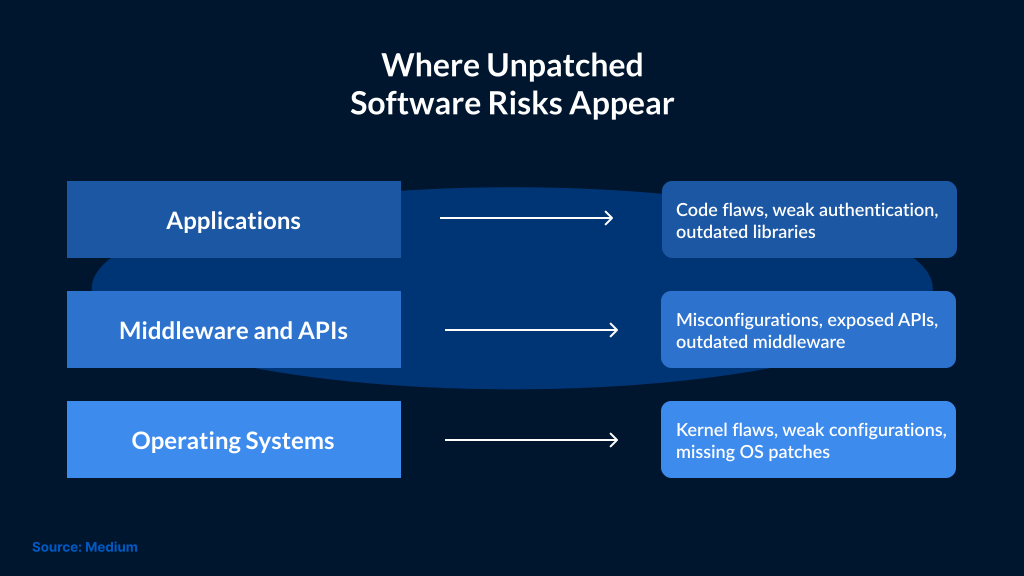
Unpatched software remains common in business environments. It is mostly found in endpoints, servers, applications, and legacy systems. This allows cybercriminals to exploit known flaws and gain unauthorized access to carry out malicious activity. These attacks can lead to remediation costs, legal expenses, downtime, and business disruption. Ignoring updates leaves systems more exposed to known exploits, making patching a core part of mitigating risk from unpatched software.
It is also hard for businesses to keep up with the steady stream of security patches and updates as technology changes and software environments become more complex. Every year, thousands of vulnerabilities are disclosed and patched, making it difficult for even mature security teams to manage. This can delay patching and leave systems exposed to threats. As a result, an unpatched software mitigation strategy is a must.
What is Unpatched Software?
Any application, operating system, or program with known security issues that have not been fixed yet is called unpatched software. Threat actors exploit these vulnerabilities to steal data or gain unauthorized access to networks. Once these flaws are identified, software vendors release patches or security updates to reduce the risk. But if organizations don't patch their software programs on time, then they leave their systems exposed to attackers. So, it is important to understand the risks posed by unpatched software and the mitigation measures to maintain system security.
Business Risks of Unpatched Software
- Data Breaches: Attackers can access sensitive business data through unpatched vulnerabilities.
- System Downtime: If an organization is using outdated or unsupported systems, then they can cause performance issues or even disrupt business operations.
- Ransomware Attacks: Ransomware groups can exploit unpatched vulnerabilities to encrypt data, steal information, and demand payment.
- Compliance Violations: It’s important for regulated businesses to maintain security controls, which include patching software where required. Failing to apply critical patches will create compliance gaps and audit issues. At times, penalties are also levied on organizations.
- Malware Infections: Cybercriminals can exploit unpatched vulnerabilities to install malware for the purpose of stealing data, maintaining persistence, or supporting further attacks.
- Reputational Damage: Attacks caused by unpatched vulnerabilities can damage the reputation of an organization and impact customer trust. In some cases, it can also lead to legal action.
Unused or unsupported software can also pose security risks, as it may contain vulnerabilities that attackers can exploit. This is especially true for legacy systems that vendors no longer support. To reduce the attack surface, businesses should review their software, remove unused programs, and ensure updates and patches are installed on time as part of an unpatched software mitigation strategy.
Real-World Impact of Unpatched Vulnerabilities
Unpatched vulnerabilities do not always remain limited to a single system. In many cases, they serve as entry points for attackers to reach other parts of the environment.
One example is the SimpleHelp RMM vulnerability, tracked as CVE-2024-57727. In 2025, CISA warned that ransomware actors exploited unpatched SimpleHelp instances. Since RMM tools are used for remote support, the risk was not limited to the tool itself. Attackers used the exposed instances to reach downstream customer environments. CISA also tied the activity to service disruption and double-extortion attacks.
A similar issue appeared with Check Point Security Gateways. CVE-2024-24919 had already been patched in May 2024. But systems that had not received the patch remained exposed. Check Point said attackers used the flaw to obtain VPN credentials. The same activity was linked to ShadowPad malware. In some cases, it also led to NailaoLocker ransomware.
These examples show the risks of delayed patching. Once a known flaw becomes public, attackers don't waste much time exploiting the systems that are still exposed. For businesses, one missed patch can become a much larger security issue.
Three Ways to Reduce Unpatched Software Risks
Unpatched software poses significant security risks if left unaddressed. Here are three steps that can help reduce security risks posed by unpatched software and support compliance requirements.
1. Set up automated patch management
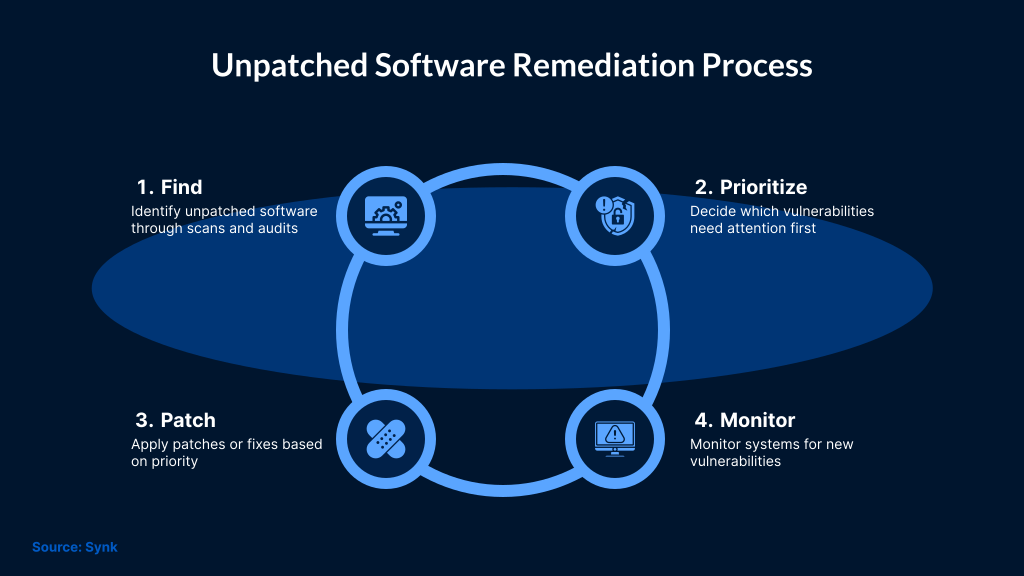
One of the best ways to reduce the risks of unpatched software is to use automated patch management. Automated tools can speed up the process of identifying missing patches and testing updates. These tools can then deploy missing patches and ensure updates occur on time.
- Advantages of Automation: When you use automated patch management, your software environment is regularly checked for vulnerabilities and updated when patches are available, tested, and approved. These tools help prioritize important patches based on severity, exploitability, asset criticality, and exposure. Automation also makes IT teams' jobs easier, which gives them more time to work on important projects.
- Integration with Endpoint Security Tools: Automated patch management makes your defense against cyber threats stronger when it is combined with security tools like endpoint protection, EDR, XDR, vulnerability management, SIEM, and firewall tools. This creates a layered security approach, which helps reduce weaknesses.
2. Make risk-based patching a top priority
Not every vulnerability carries the same level of risk. So, it is better to use a risk-based patching approach that evaluates the vulnerability based on its possible impact on the system. This helps teams decide which patches to apply first.
- Checking for Vulnerability Severity: To check the severity of a vulnerability, use tools like the Common Vulnerability Scoring System (CVSS). High CVSS scores should be reviewed first, but prioritization should also consider exploit activity, asset exposure, and business impact.
- Using information about threats: You can add threat intelligence to your patch management process to stay up to date on new threats. It also helps identify vulnerabilities that attackers are actively exploiting, so you can patch them first.
- Tips for Deploying Patches: Deploy the patches in stages, starting with high-risk systems or controlled test groups. This will keep things smooth and help resolve any issues arising during patch deployment.
3. Maintain an inventory of software and assets
For patch management to work well, organizations need clear visibility into the software, systems, and assets they use. To identify and remediate unpatched vulnerabilities, it is important to do regular software checks and keep an accurate software inventory.
- Regular Audits: By conducting regular audits of your software environment, you can find outdated or unsupported software. You can replace those software programs with ones that receive updates and are also supported by the systems in your IT environment. Make sure to audit all systems, servers, endpoints, applications, and cloud assets. If you find any vulnerabilities, try to fix them right away.
- Keeping an accurate list of software: Make a list of all the software and systems, their current versions, the status of patches, and known vulnerabilities. With this, you can ensure that all critical systems are patched on time and that no vulnerabilities are missed.
- Taking Care of Old Systems: If your organization uses legacy systems that no longer receive vendor support or regular updates, then those can be vulnerable to cyber attacks. It's important to either isolate them from the main network or replace them with new and secure systems.

Conclusion
Unpatched software is a security risk that can expose organizations to data breaches and compliance issues. So, it is important for organizations to update and patch systems on time to reduce exposure to known threats. Automated patch management tools can help with this. Organizations should also conduct regular audits to identify outdated systems and software. In addition, they should run cybersecurity awareness programs to reduce these risks. SafeAeon offers proactive security support that helps businesses manage software security risks and support their security needs.